
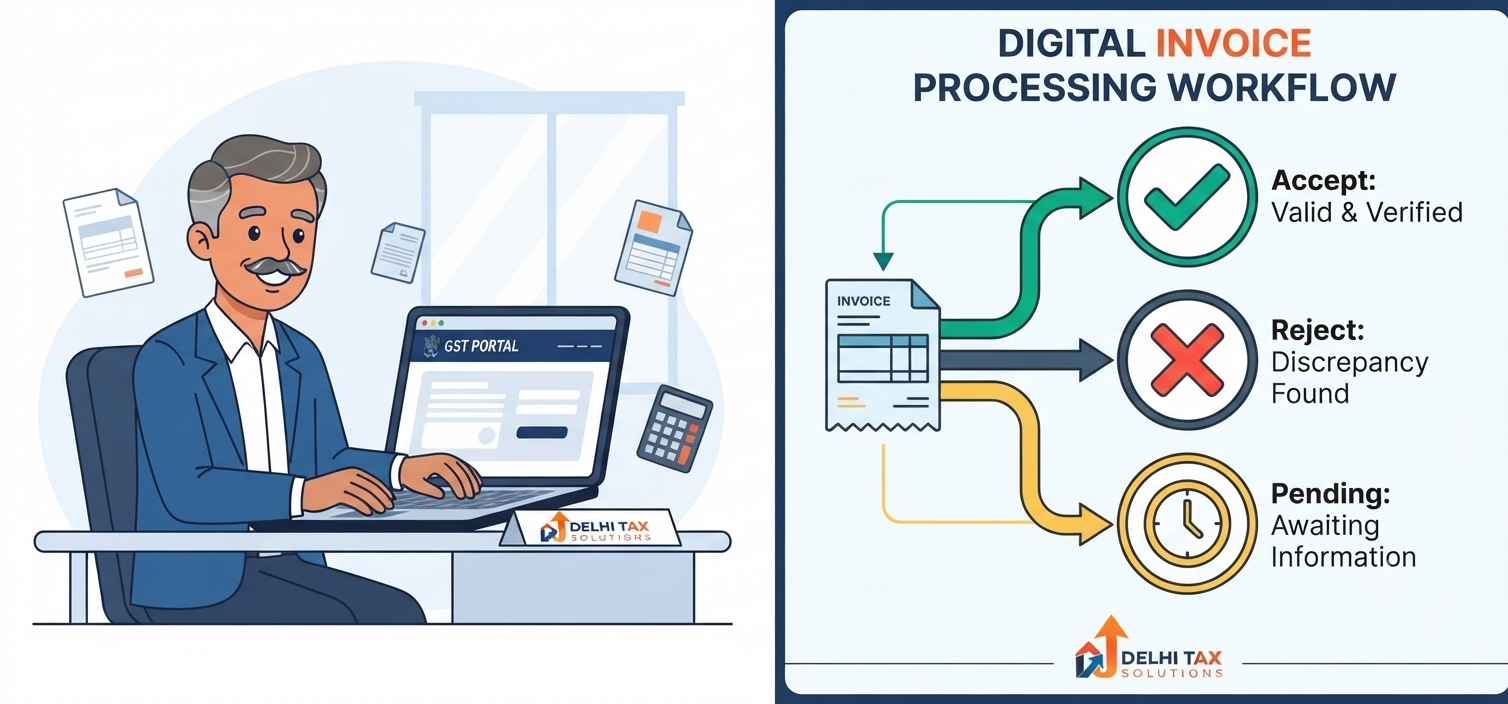
💡 Key Takeaways: Invoice Management System (IMS)
- Interactive ITC Claiming: IMS allows taxpayers to interact directly with supplier invoices before they populate the final GSTR-2B.
- Three Core Actions: You can Accept, Reject, or mark invoices as Pending directly on the GST portal.
- Deemed Acceptance: If you take no action on an invoice in the IMS, the portal automatically considers it “Accepted” for that tax period.
- Fewer Notices: Properly utilizing the “Reject” function prevents accidental claiming of ineligible ITC, drastically reducing departmental notices.
Managing Input Tax Credit (ITC) has always been one of the most critical, yet frustrating, aspects of Indian tax compliance. Just one incorrect invoice filed by a supplier could trigger a mismatched GSTR-2B, leading to working capital blockages or departmental scrutiny.
To solve this, the government introduced the Invoice Management System (IMS) in GST. This revolutionary facility shifts the power back to the recipient, allowing businesses to actively filter inward supplies before finalizing their returns. Whether you handle compliance for a massive corporation or a growing MSME, mastering the IMS is no longer optional.
This guide covers exactly how the invoice management system gst framework operates, how it alters your monthly filing routine, and strategic advice from our compliance experts to keep your ITC safe.
What is the Invoice Management System (IMS) in GST?
The Invoice Management System (IMS) in GST is an interactive facility provided on the official GST Portal that allows recipient taxpayers to accept, reject, or keep pending the invoices saved by their suppliers in GSTR-1, IFF, or GSTR-1A. Instead of passively receiving whatever the supplier files, the recipient can now audit and act on these records dynamically. The actions taken within the IMS directly dictate which invoices will flow into the recipient’s finalized GSTR-2B, thereby determining the eligible Input Tax Credit for that specific tax period.
How Does IMS Impact GSTR-2B and ITC?
Before IMS, the generation of GSTR-2B (the static auto-drafted ITC statement) was entirely dependent on the supplier. Whatever a supplier uploaded simply appeared in the recipient’s return. If a supplier accidentally billed you instead of another client, you had to manually track and reverse that ITC in your GSTR-3B.
With the introduction of ims gst functionality, this passive flow is broken. The workflow now includes an intermediate staging area. When a supplier saves an invoice, it reflects in your IMS dashboard almost immediately. You review it, take action, and only the approved data moves forward.
The Shift from Passive to Active Compliance
When you generate your GSTR-2B on the 14th of the month, the system compiles only the invoices you have explicitly accepted, plus any invoices you left untouched (which are deemed accepted). Invoices you rejected are entirely excluded from your ITC pool.
The Three Actions in IMS: Accept, Reject, Pending
The gst invoice management system portal provides three highly specific buttons for every inward record. Understanding the legal implication of each is crucial for accurate GST Services & Filing.
1. Accept
Clicking “Accept” means you acknowledge the invoice is valid, the goods/services were received, and you are legally entitled to claim the ITC. Once accepted, this invoice becomes a permanent part of your GSTR-2B for the current month.
2. Reject
You should use the “Reject” function when an invoice does not belong to you, contains severe errors (wrong GSTIN, incorrect tax amount), or represents a canceled transaction. Rejected invoices are blocked from entering your GSTR-2B, ensuring you do not accidentally claim credit you aren’t owed.
3. Pending
The “Pending” action is perhaps the most strategic tool in the IMS. You select this when you have received the invoice digitally, but the physical goods are still in transit, or there is an ongoing dispute regarding the pricing. A pending invoice is deferred; it will not flow into the current month’s GSTR-2B but will roll over to the next month’s IMS dashboard for future action.
Old vs. New ITC Claim Process
To fully grasp the magnitude of this update, observe how the compliance workflow has changed for Indian businesses.
| Process Feature | Old System (Pre-IMS) | New System (With IMS) |
|---|---|---|
| Invoice Visibility | Visible only after the 14th via GSTR-2B. | Visible near real-time as supplier saves data. |
| Recipient Control | Passive. Must deal with errors via GSTR-3B reversals. | Active. Can reject errors before GSTR-2B generation. |
| Handling Goods in Transit | Manually track and reverse ITC, then reclaim later. | Simply mark the invoice as “Pending” in IMS. |
| Default Status | All uploaded invoices flow into GSTR-2B. | No action taken results in “Deemed Accepted”. |
This structural change heavily benefits businesses handling hundreds of monthly invoices, vastly reducing manual reconciliation spreadsheets.
Step-by-Step: How to Use IMS on the GST Portal
Navigating the new module is straightforward if you follow the correct sequence. Here is how to process your inward supplies.
- Log In: Access the official GST portal using your credentials.
- Navigate to IMS: Go to Services > Returns > Invoice Management System (IMS).
- Select Financial Year: Choose the relevant FY and the active tax period.
- Review the Dashboard: You will see a summary of all inward supplies (B2B, Credit Notes, Debit Notes).
- Take Action: Open the detailed view. Select multiple invoices and choose to Accept, Reject, or mark them as Pending.
- Save and Generate: Once all actions are complete, save the dashboard. On the 14th of the month, compute your GSTR-2B based on these actions.
Remember that learning how to use ims in gst requires discipline. You must complete your actions before the cutoff date for GSTR-2B generation.
Struggling with ITC Reconciliation?
A single mistake in the IMS can lead to blocked working capital or aggressive GST notices. The transition from passive to active invoice management requires a sharp eye.
The expert compliance team at Delhi Tax Solutions can manage your entire IMS dashboard, ensuring perfect reconciliation and maximum legitimate ITC claims.
Common Mistakes to Avoid (CA Team Insights)
Based on cases handled by our CA team, the transition to the invoice management system gst framework has caused a few predictable stumbles for taxpayers.
Firstly, the trap of deemed acceptance. If you ignore the IMS dashboard entirely, the portal assumes you have accepted every single invoice your suppliers uploaded. If a supplier made a typo and billed you for ₹10,00,000 instead of ₹1,00,000, that massive ITC flows into your GSTR-2B. Reversing this later in GSTR-3B invites unnecessary scrutiny from the CBIC GST Desk.
Secondly, misusing the “Reject” button. Our advisory team strongly recommends using “Pending” instead of “Reject” for minor clerical errors that the supplier intends to fix via an amendment. Once you reject an invoice, it is permanently killed for that month. If the supplier amends it later, it can create a messy reconciliation trail. Only reject invoices that unequivocally do not belong to your GST Registration Online profile.
Conclusion: A New Era of GST Compliance
The Invoice Management System represents a massive leap toward cleaner, dispute-free taxation in India. By allowing you to accept valid bills, reject errors, and defer pending transactions, the government has given you direct control over your GSTR-2B.
However, this power comes with the responsibility of regular, active monitoring. Talk to a Delhi Tax Solutions expert to get your GST reconciliation process updated for the IMS era. Embracing this system today will guarantee a smoother, notice-free audit season tomorrow.
Frequently Asked Questions (FAQs)
+ Q: What is the Invoice Management System (IMS) in GST?
A: The Invoice Management System (IMS) in GST is a digital facility on the GST portal that allows taxpayers to review inward supply invoices uploaded by their suppliers. Users can actively Accept, Reject, or mark these invoices as Pending, which directly dictates whether the Input Tax Credit for those invoices will flow into their auto-generated GSTR-2B statement for the month.
+ Q: Is it mandatory to take action in IMS for all invoices?
A: No, physically clicking a button for every single invoice is not strictly mandatory, but it is highly recommended. If you take no action on an invoice sitting in your IMS dashboard, the GST portal applies a rule of “deemed acceptance.” This means the untouched invoice will automatically be considered accepted and will flow into your GSTR-2B, potentially causing inaccurate ITC claims if the invoice contained errors.
+ Q: What happens if I keep an invoice pending in IMS?
A: When you mark an invoice as “Pending” in the IMS, it is temporarily parked. The invoice will not be included in your current month’s GSTR-2B, meaning you cannot claim the ITC right now. Instead, the invoice rolls over to the IMS dashboard of the subsequent month. This action is ideal for situations where you have received the digital bill but are still waiting for the physical goods to arrive in transit.
+ Q: How does IMS affect the generation of GSTR-2B?
A: Prior to IMS, GSTR-2B was generated passively based entirely on what the supplier uploaded. Now, GSTR-2B generation is contingent on the recipient’s IMS actions. Only the invoices that are explicitly “Accepted” or left untouched (“Deemed Accepted”) will formulate the final ITC statement. Any records you have actively “Rejected” or marked as “Pending” are successfully filtered out of the final GSTR-2B draft.
+ Q: Can I change my action (accept/reject) after submitting it in IMS?
A: Yes, the GST portal allows taxpayers to modify their actions within the IMS dashboard multiple times. However, there is a strict deadline. You can only change an action (for example, switching an invoice from Reject to Accept) up until the time you officially generate your GSTR-2B for that specific tax period. Once the GSTR-2B is generated, the actions taken for that month are locked.
About this article: Researched using official government sources, real-time competitor and search-trend analysis, and Delhi Tax Solutions’ in-house tax advisory team. Last updated September 2026.
Disclaimer: This article is for general informational purposes and is not a substitute for personalised professional tax advice. Please consult a qualified tax advisor or Chartered Accountant to ensure full compliance.