
💡 Key Takeaways
- E-campaigns are data-driven compliance nudges sent via SMS or email when financial transactions mismatch with filed ITRs.
- Unlike formal scrutiny notices, e-campaigns are softer outreach alerts designed to encourage voluntary correction and transparency.
- Responses and feedback must be submitted directly through the e-Filing Compliance Portal under the ‘e-Verification’ tab.
- Feedback options include agreeing with the data, disputing the transaction, or confirming that the income belongs to another person.
- Ignoring e-campaigns can escalate data discrepancies into formal scrutiny assessments, tax demands, or TDS Compliance audits.
If you have recently received an SMS or email alert from the tax administration stating that your financial data reflects discrepancies, you are likely looking at an income tax e-campaign notification. Far from being a reason to panic, these alerts represent a modern, data-driven approach by the tax administration to help taxpayers voluntarily reconcile their financial records before formal legal procedures begin. Knowing how to respond to e-campaign compliance portal alerts is essential for every taxpayer aiming to maintain a clean financial profile. Whether managing personal investments or overseeing business Income Tax Filing, understanding how these digital nudges operate protects you from unnecessary friction.
What Is an Income Tax E-Campaign?
The Power of Statement of Financial Transactions (SFT)
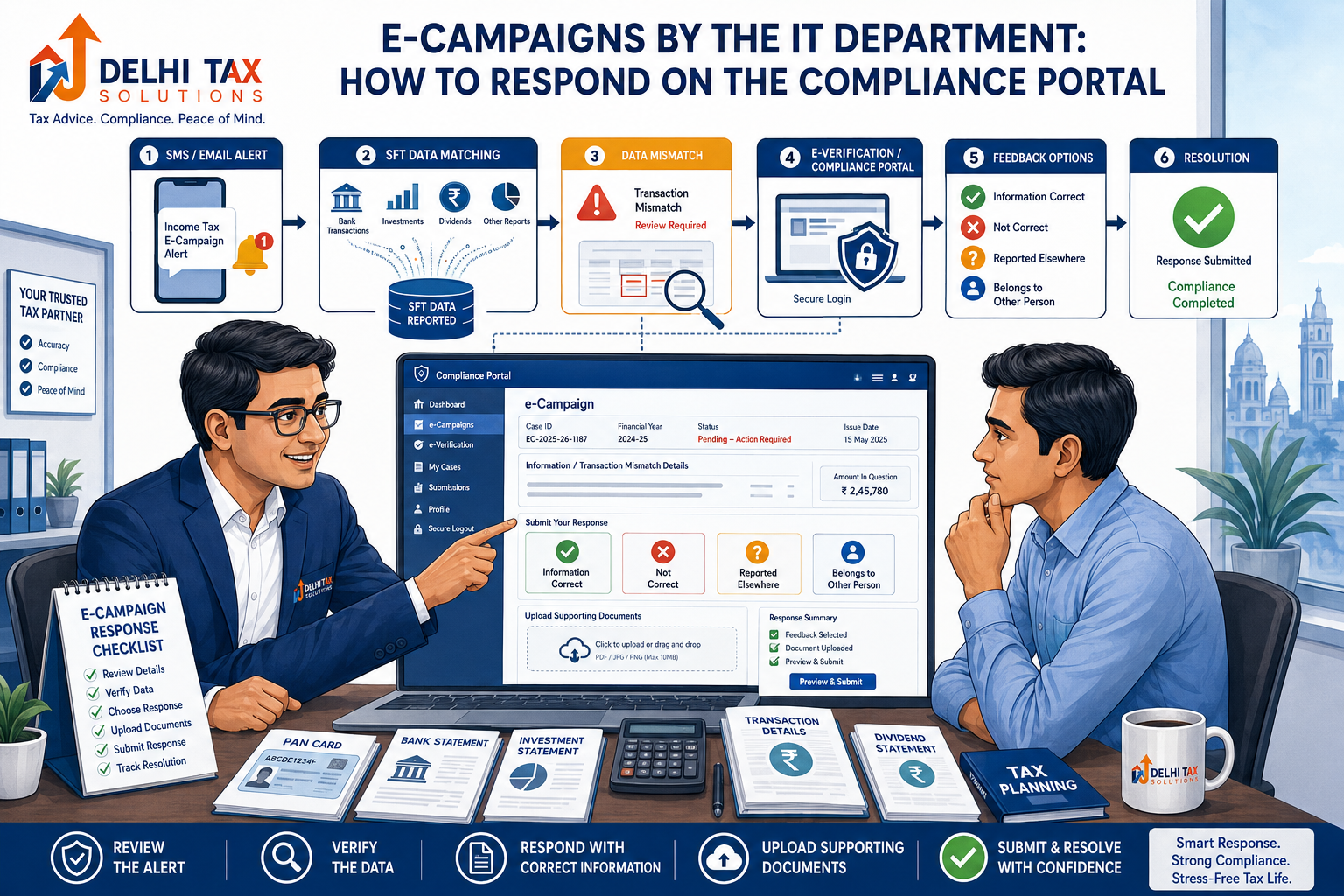
The Income Tax Department receives massive streams of financial data from third-party reporting entities—such as banks, mutual fund houses, registrars, and stock exchanges—via the Statement of Financial Transactions (SFT). When advanced data-matching algorithms compare this SFT data against your submitted tax return and find a mismatch (such as high-value cash deposits, foreign travel, or dividend earnings omitted from your ITR), the system triggers an income tax e-campaign notice. These campaigns are deployed nationwide to bridge the gap between reported income and actual financial activity.
E-Campaign vs. Formal Scrutiny Notice
It is vital to distinguish between a soft e-campaign and a hard legal notice. An e-campaign is essentially an informative, voluntary nudge. It does not carry formal legal demands under Section 143(2) or Section 148 immediately. Instead, it invites you to review your data and submit your feedback online. However, treating this nudge with indifference can easily convert a soft e-campaign into a rigid scrutiny assessment. Corporate entities undergoing formal Company Registration and compliance must ensure all financial trails align perfectly to prevent automated red flags.
Step-by-Step Guide to Responding on the Compliance Portal
Step 1: Log Into the e-Filing Portal
To view your campaign details, navigate to the official Income Tax Department e-filing portal using your credentials. Once logged in, navigate to the ‘Pending Actions’ menu tab on the top dashboard and select ‘Compliance Portal’. This securely redirects you to the dedicated compliance management workspace.
Step 2: Accessing the E-Verification Tab
Inside the Compliance Portal, look for the ‘e-Campaign’ or ‘e-Verification’ section. Here, you will see a detailed list of financial transactions flagged for your specific PAN across various assessment years. Each entry displays specific data points, such as the source of information, transaction amount, and the nature of the financial activity. Reviewing Property Tax records, capital gains statements, and high-value bank entries helps clarify any discrepancies before submitting your response.
⚡ Key Action
Do not ignore portal alerts. Submitting prompt feedback online closes the compliance loop and prevents automated escalation to higher tax authorities.
Available Feedback Options on the Portal
Choosing the Correct Response Category
When you click on a specific flagged transaction, the portal prompts you to select one of several feedback options. Choosing the correct response is critical for a valid compliance portal e-verification response. The available options typically include:
- Information is correct and income is not taxable: Select this if the transaction happened, but it is exempt or below taxable thresholds.
- Information is correct, but the income has been reported in another ITR: Use this if the transaction belongs to you, but was filed under a different return or head of income.
- Information is not fully correct: Choose this if the reported amount or transaction value is inaccurate.
- Information relates to other person/entity: Select this if the bank account, folio, or asset belongs to a family member or third party.
- Information is not related to me: Use this strictly if you suspect identity theft, PAN misuse, or erroneous data mapping by the reporting institution.
Submitting Supporting Explanations
After selecting your feedback category, the portal allows you to enter brief explanatory remarks and, where necessary, upload supporting documents. Businesses handling complex multi-state operations or GST Registration reconciliations should attach ledger extracts or bank certificates to substantiate their response.
| Campaign Stage / Feature | Description & Action Required |
|---|---|
| Trigger Mechanism | Automated SMS/email alert driven by SFT data matching against filed ITRs. |
| Portal Navigation | Log in > Pending Actions > Compliance Portal > e-Campaign tab. |
| Feedback Submission | Select appropriate response category (Correct, Disputed, Belongs to others). |
| Consequence of Responding | Closes data mismatch loop voluntarily without penalty or scrutiny. |
| Consequence of Ignoring | Escalation to formal notices, scrutiny assessments, and tax demands. |
Why Prompt Action Matters and Professional Support
Avoiding Escalation to Scrutiny
Official releases by the Press Information Bureau frequently highlight the government’s push toward transparent, faceless digital compliance. E-campaigns are designed to give taxpayers the first right of explanation. If you submit a clear, logical response supported by documents, the system marks the compliance loop as satisfied. Conversely, letting the deadline lapse signals defiance, prompting tax officers to launch formal scrutiny proceedings under the watchful eyes of economic regulators like the Reserve Bank of India and the Ministry of Corporate Affairs.
Expert CA Advisory
Navigating portal interfaces and drafting precise legal explanations for financial mismatches can be daunting. If you are unsure how to classify a disputed transaction, how to handle PAN misuse, or how to rectify an omitted income stream, professional guidance is invaluable. Talk to a Delhi Tax Solutions expert today. Our certified Chartered Accountants will analyze your compliance portal profile, reconcile your SFT data, draft watertight responses, and ensure your tax record remains pristine.
Receiving an e-campaign alert should be viewed as an opportunity to correct the record, not a cause for alarm. Understanding how to respond to e-campaign compliance portal notifications empowers you to resolve data mismatches swiftly and professionally. Connect with Delhi Tax Solutions to secure expert assistance and maintain flawless compliance across all your tax filings.
About this article: Researched using official government sources and Delhi Tax Solutions’ in-house tax advisory team. Last updated August 2026.
Frequently Asked Questions (FAQs)
Q: What is an e-campaign notice from the Income Tax Department?
A: An e-campaign notice is a digital compliance alert sent via SMS or email when advanced data-matching algorithms detect a mismatch between your financial transactions (reported via SFT) and the income declared in your filed income tax return.
Q: How is an e-campaign different from a formal scrutiny notice?
A: An e-campaign is a soft, voluntary nudge inviting you to review and reconcile your financial data online without immediate legal penalties. A formal scrutiny notice is a statutory legal command issued under specific sections of the Income Tax Act requiring mandatory legal representation and detailed audit proceedings.
Q: Where on the Compliance Portal can I check and respond to e-campaigns?
A: To check and respond to e-campaigns, log into the official Income Tax e-filing portal, navigate to the ‘Pending Actions’ tab on the top menu, select ‘Compliance Portal’, and then access the ‘e-Campaign’ or ‘e-Verification’ section.
Q: What options are available when submitting feedback on high-value transactions?
A: When submitting feedback on the compliance portal, you can choose options such as: information is correct and non-taxable, information is correct but reported in another ITR, information is incorrect, information belongs to another person, or information is completely unrelated to you.
Q: Is it mandatory to respond to an income tax e-campaign alert?
A: While e-campaigns are voluntary outreach nudges, ignoring them is strongly discouraged. Failing to respond leaves data mismatches unaddressed, which frequently triggers automated escalation into formal scrutiny notices, tax demands, and penalty proceedings.
