
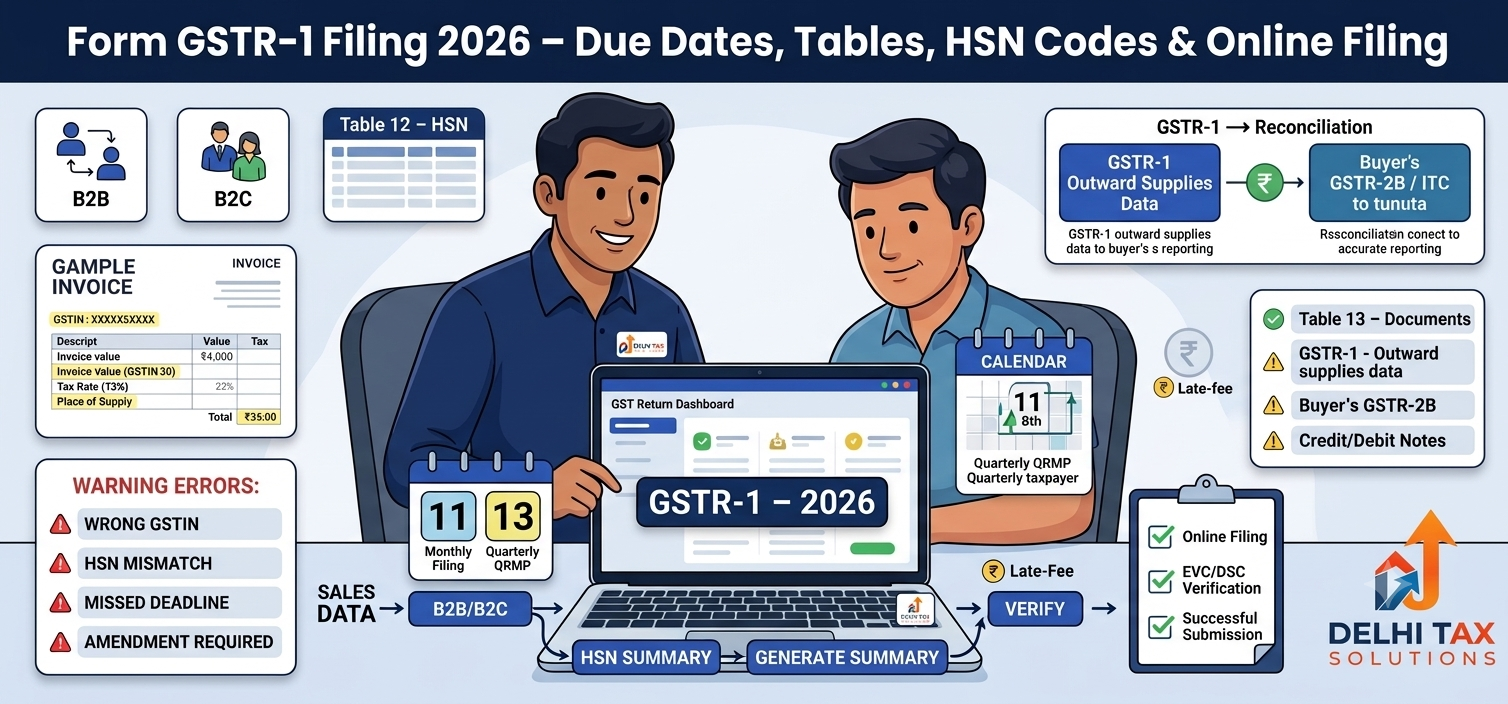
💡 Key Takeaways:
- Filing form GSTR-1 is mandatory for all registered businesses reporting sales.
- Monthly filers must submit by the 11th; quarterly QRMP filers by the 13th.
- Table 12 requires strict HSN code mapping based on your aggregate turnover.
- Late fees cap at ₹2,000 for small businesses and ₹10,000 for large enterprises.
- Filing purely online prevents ITC claim delays for your B2B buyers.
Filing tax returns can quickly trigger compliance anxiety, especially when portal errors block your submission at the last minute. In India, managing your form GSTR-1 correctly is the cornerstone of keeping your business compliant and your buyers happy. When you report your sales accurately, your clients successfully claim their tax credits. Get it wrong, and business relationships suffer.
According to the latest Central Board of Indirect Taxes and Customs (CBIC) updates, the government is strictly enforcing data validation across the GST Portal. Today, you cannot simply punch in summary numbers and walk away. The system cross-verifies invoice dates, limits, and product codes instantly.
This comprehensive guide breaks down the exact steps to file your return in 2026. You will learn the current due dates, how to classify your outward supplies, and how to avoid the most common rejection triggers our CA team handles daily.
What is Form GSTR 1?
Form GSTR-1 is a mandatory monthly or quarterly return under GST that captures all outward supplies of goods and services. Every registered taxable person must file it, detailing their B2B and B2C sales, exports, and issued credit/debit notes. It acts as the foundational document for GST compliance, automatically populating the buyer’s GSTR-2B so they can claim Input Tax Credit (ITC). Filing it accurately ensures smooth operations and prevents severe portal penalties.
Form GSTR-1 Due Date Requirements in 2026
Missing a due date triggers immediate late fees. The Goods and Services Tax Network (GSTN) classifies taxpayers based on their aggregate annual turnover to determine their filing frequency. If your turnover exceeds ₹5 Crore, you must file monthly. If you fall below that threshold, you can opt into the Quarterly Return Filing and Monthly Payment of Taxes (QRMP) scheme.
Here is the exact deadline structure for the current financial year:
| Filing Type | Turnover Threshold | Due Date | Late Fee Penalty (Max Cap) |
|---|---|---|---|
| Monthly | Above ₹5 Crore | 11th of the following month | ₹10,000 (₹5,000 CGST + ₹5,000 SGST) |
| Quarterly (QRMP) | Up to ₹5 Crore | 13th of the month following quarter | ₹2,000 (₹1,000 CGST + ₹1,000 SGST) |
| Nil Return | Any | Same as applicable above | ₹500 (₹250 CGST + ₹250 SGST) |
Late fees accrue at ₹50 per day for standard returns and ₹20 per day for Nil returns. Furthermore, a major GSTN advisory states that taxpayers can no longer file a return beyond three years from its original deadline. This locks the system against retrospective data manipulation.
Reporting Outward Supplies: Important Tables
The core function of this return is to categorize your outward supplies correctly. Entering data in the wrong table causes massive reconciliation headaches downstream. If you operate an entity requiring formal company registration, your invoicing volume will require strict mapping.
The GST portal segregates your sales into specific tables. You must identify WHO you sold to and WHERE the supply occurred.
| GST Table Number | Type of Transaction Captured | Critical Reporting Details |
|---|---|---|
| Table 4A, 4B, 4C | B2B (Business to Business) | Buyer’s GSTIN, invoice value, tax rate, and POS. |
| Table 5 | B2C Large (Inter-state) | Unregistered buyer sales exceeding ₹2.5 Lakh. |
| Table 7 | B2C Small | Intra-state unregistered sales and small inter-state sales. |
| Table 12 | HSN Code Summary | Mandatory product/service classification codes. |
| Table 13 | Documents Issued | Total invoice serial numbers used during the period. |
As per recent guidelines published by the CBIC Official channels, Table 12 now requires mandatory 4-digit codes for businesses up to ₹5 Crore turnover, and 6-digit codes for those above it. Leaving this table blank will trigger an automatic portal rejection.
Step-by-Step Form GSTR 1 Filing on the GST Portal
Filing directly on the government portal is straightforward if your data is organized. Follow these exact steps to complete your submission without relying on offline utilities.
Step 1: Access the Dashboard. Log in using your valid credentials. Navigate to Services > Returns > Returns Dashboard. Select the current Financial Year and the specific month or quarter.
Step 2: Initiate Online Preparation. Click on “Prepare Online” under the GSTR-1 tile. If your business generates e-invoices, check the portal first. Data from the Invoice Registration Portal auto-populates into Tables 4A, 6A, and 9B within two days.
Step 3: Enter Sales Data. Open each applicable tile. Add your B2B invoices meticulously, ensuring the buyer’s GSTIN is correct. Next, consolidate your consumer sales into the B2C tiles. Finally, complete Table 12 for your product codes.
Step 4: Generate the Summary. Scroll to the bottom and click “Generate Summary”. The system takes a few moments to compile your entries. Refresh the page to view the final consolidated tax liability.
Step 5: Verify and Submit. Click “Proceed to File/Summary”. Cross-check the portal’s totals against your own accounting books. Once verified, click “File Statement”. Authenticate the return using an Electronic Verification Code (EVC) via OTP, or a Digital Signature Certificate (DSC) if you are a corporate entity.
If you are just starting out and need help generating your initial login credentials, review our guide on GST registration basics to ensure your account setup is flawless.
Handling B2B Invoices and HSN Summary Errors
Even seasoned business owners hit roadblocks during filing. The system is designed to reject mathematically flawed entries instantly. Grouping your data logically—what we call semantic clustering—prevents these last-minute errors.
Based on cases handled by our CA team at Delhi Tax Solutions, the most frequent failure point is the HSN summary. Our tax advisory team regularly sees clients panic over mismatched Table 12 entries. Recently, a client’s return was rejected purely because they used a 4-digit product code on a high-value B2B invoice when their turnover required 6 digits. The portal strictly enforces this.
Another common mistake involves amending previously filed invoices. If you make a typo on a buyer’s GSTIN, you cannot change it in the current month’s regular tile. You must use Table 9A (Amended B2B Invoices) to rectify past errors. Staying updated on these nuanced GST filing rules ensures you never overpay taxes or block a client’s credit.
Conclusion
Filing your return accurately is not just a regulatory chore; it is vital for maintaining healthy business cash flows. To succeed, always hit the 11th or 13th deadline, classify your B2B and B2C sales meticulously, and never ignore the strict Table 12 product code validations. If the portal interface feels overwhelming, do not risk a high-penalty rejection. Talk to a Delhi Tax Solutions expert today to get your GST return filed securely within 24 hours. The shift toward automated, AI-driven tax scrutiny means absolute precision is the only way forward for modern Indian businesses.
You can explore additional financial insights across our tax and finance blogs. Staying informed protects your business against unexpected tax liabilities.
About this article: Researched using official government sources, real-time competitor and search-trend analysis, and Delhi Tax Solutions’ in-house tax advisory team. Last updated September 2026.
Disclaimer: This article is for general informational purposes and is not a substitute for personalised professional tax advice.
Frequently Asked Questions (FAQs)
Q: What happens if I miss the due date for form GSTR-1?
A: Missing the due date instantly triggers a daily late fee penalty on the GST portal. You will be charged ₹50 per day for standard business operations, or ₹20 per day if you have zero sales to report. The maximum penalty is capped at ₹2,000 for small entities (up to ₹1.5 Crore turnover) and climbs to ₹10,000 for large enterprises.
Q: Do I need to file form GSTR-1 if I have zero outward supplies?
A: Yes, you are legally required to file a Nil return even if you made no sales or outward supplies during that specific month or quarter. Fortunately, the GST portal allows you to file a Nil return quickly via an SMS facility or directly through the dashboard, taking less than two minutes to complete.
Q: What is the difference between B2B and B2C invoices in GST?
A: B2B (Business to Business) invoices are issued to registered buyers holding a valid GSTIN, allowing them to claim Input Tax Credit on their purchases. B2C (Business to Consumer) invoices are issued to unregistered end-users. In your return, B2B sales must be reported invoice-wise, whereas most B2C sales are reported as a consolidated state-wise summary.
Q: How do I correct mistakes after filing my outward supplies?
A: Once a return is officially filed, you cannot revise that specific month’s form. However, the government allows you to amend errors in the subsequent month’s filing using specific amendment tables (like Table 9A for past invoices). You must ensure these corrections are made before the annual cutoff date to remain compliant.
Q: What is the minimum HSN summary requirement for Table 12?
A: The minimum code requirement depends entirely on your aggregate business turnover. If your annual turnover is up to ₹5 Crore, you must provide 4-digit codes for all your B2B tax invoices. If your turnover exceeds ₹5 Crore, the portal mandates 6-digit codes for both B2B and B2C invoices. Leaving this blank results in submission failure.