
💡 Key Takeaways:
- Notices trigger when GSTR-3B ITC exceeds GSTR-2B by even small margins.
- Respond to ASMT-10 within 30 days to block demand escalation.
- Section 16(4) strict deadlines govern all eligible credit claims.
- Attach exact invoice reconciliations and supplier confirmations.
- Professional CA drafting minimizes arbitrary penalty assessments.
Opening your email to find an ASMT-10 or DRC-01 notice from the tax department instantly spikes stress levels. Over the last few months, the automated tax system has been aggressively issuing these alerts. If your claimed Input Tax Credit (ITC) does not perfectly match the department’s automated records, you will likely face an inquiry.
The primary trigger for a GST ITC mismatch notice reply requirement is the discrepancy between your filed GSTR-3B and your auto-populated GSTR-2B. When the system spots a gap, it assumes you have claimed excess credit. Ignoring this alert is the worst possible move. It rapidly turns a simple query into an enforceable tax demand accompanied by heavy interest and penalties.
Fortunately, receiving a notice does not immediately mean you are in the wrong. Data entry errors, delayed supplier filings, and legitimate transition issues often cause these gaps. This guide will walk you through exactly how to decode the notice, reconcile your data, and submit a bulletproof response.
What is a GST ITC Mismatch Notice and How Do You Reply?
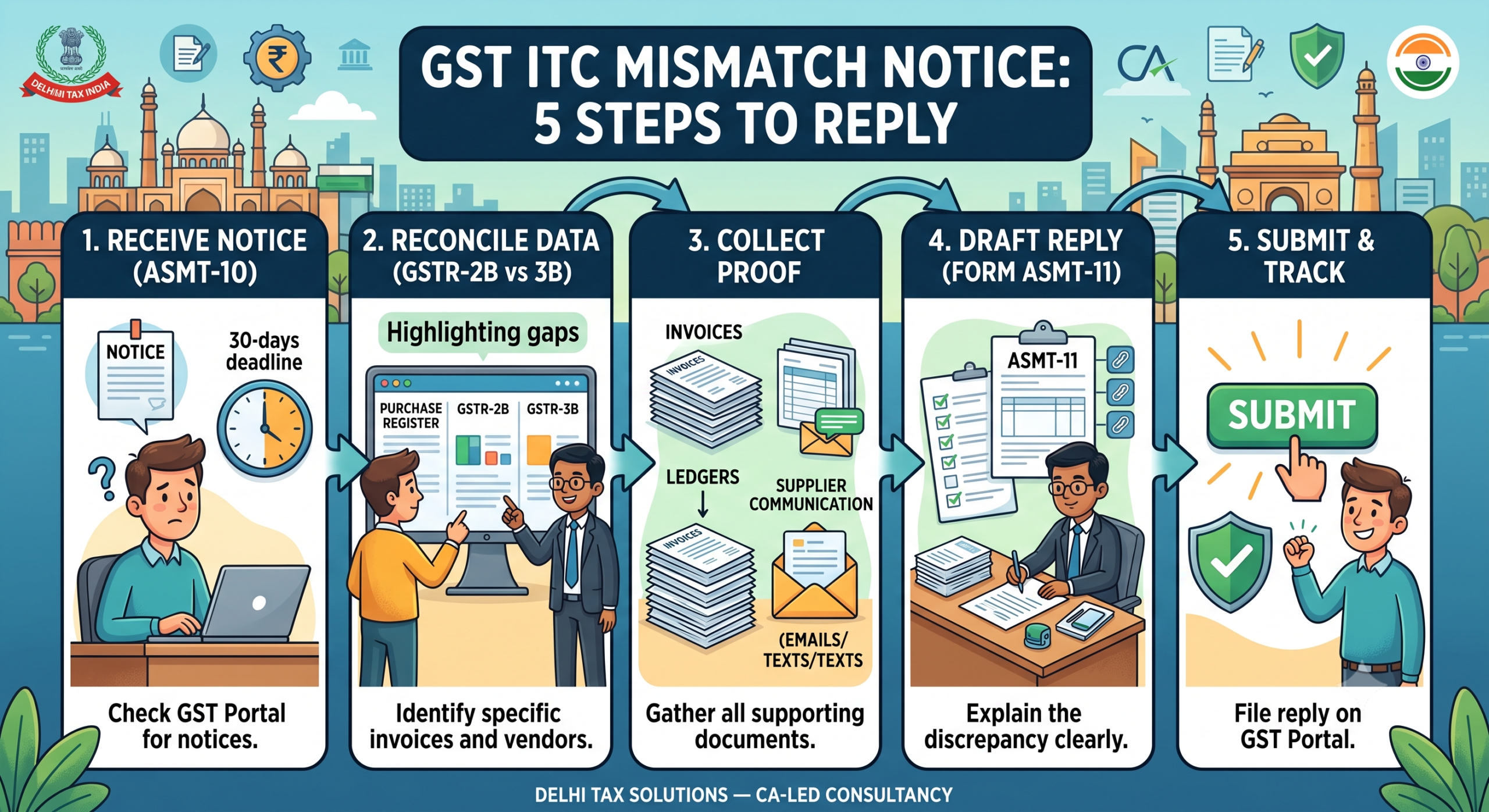
A GST ITC mismatch notice is an official communication, usually issued in form ASMT-10, alerting a taxpayer that the Input Tax Credit claimed in GSTR-3B exceeds the eligible credit reflected in GSTR-2B. To reply, you must log into the official GST Portal, navigate to the ‘View Additional Notices’ tab, and file form ASMT-11. Your response must include a detailed reconciliation statement, purchase register extracts, and written explanations for any valid discrepancies within 30 days.
The Legal Framework Behind GSTR-2B and GSTR-3B Mismatches
Understanding the exact legal rules dictating your ITC claims is crucial for a strong defence. The tax department relies heavily on automated matching, but the law provides specific conditions that protect genuine taxpayers.
Your right to claim ITC stems from Section 16 of the CGST Act. The law mandates four primary conditions: possessing a valid tax invoice, actual receipt of goods or services, payment of tax to the government by the supplier, and filing your GST return. A major point of contention in every section 16(4) GST notice is the timeline. According to recent CBIC circulars, the absolute deadline to claim ITC for a financial year is November 30th of the following year, or the date of filing the annual return, whichever is earlier.
Historically, taxpayers reconciled their books against GSTR-2A, a dynamic statement that updated whenever a supplier filed late. The government solved this by introducing GSTR-2B, which is a static statement cutting off on the 14th of the following month. If your supplier files on the 15th, that credit rolls over to your next month’s GSTR-2B. Claiming it in the current month’s GSTR-3B instantly triggers a mismatch flag.
Common Reasons for ITC Mismatches in FY 2025-26
Before you draft a GST ITC mismatch notice reply, you must identify exactly why the gap exists. Tax officers see the same specific errors repeatedly, starting with vendor filing delays where the vendor files GSTR-1 after the portal deadline. Simple human error also causes massive tax headaches due to typographical mistakes in invoice numbers or tax values. Additionally, out-of-state vendors accidentally billing with CGST/SGST instead of IGST will block your ITC access.
Step-by-Step Guide: How to Reply to a GST Notice for ITC Mismatch
Acting quickly and methodically is your best defence. Follow these steps to prepare an accurate and legally compliant response:
- Step 1: Verify the Notice on the Portal: Log into your dashboard, navigate to Services > User Services > View Additional Notices and Orders, and download the complete ASMT-10 document.
- Step 2: Reconcile Your Purchase Register: Pull your internal purchase register, export GSTR-2B data, and run a line-by-line VLOOKUP matching invoice numbers, dates, and tax amounts.
- Step 3: Draft and File Form ASMT-11: Submit your formal reply through form ASMT-11 with a detailed cover letter and reconciled Excel sheets attached as a PDF. For professional support, explore our GST registration and compliance dispute services.
| Feature | Old Regime (Prior to 2022) | New Regime (Current) |
|---|---|---|
| Base Document | GSTR-2A (Dynamic, constantly updating) | GSTR-2B (Static, fixed cutoff date) |
| Provisional ITC | Allowed up to 20%, then 10%, then 5% | Strictly 0%. No provisional credit allowed. |
| Matching Requirement | Loose matching; notices issued during annual audits | Automated matching; notices triggered almost instantly |
| Claim Deadline | Due date of September returns | November 30th of the following financial year |
What Our CA Team Sees in Practice
Handling tax discrepancy notices requires precision because the department heavily utilizes data analytics, issuing automated notices for mismatches as low as ₹100. For stubborn vendors who refuse to amend their GSTR-1, we advise withholding pending payments and documenting email follow-ups. Presenting this trail demonstrates your genuine intent, helping waive harsh penalties under Section 73. For more insights, browse our Tax Blog Hub.
Handling a tax discrepancy does not have to be a nightmare if you approach it systematically. Remember to closely monitor your static GSTR-2B, aggressively follow up with delayed vendors, and never miss the 30-day response window for an ASMT-10. Talk to a Delhi Tax Solutions expert to get your GST replies drafted and filed securely within days.
About this article: Researched using official government sources, real-time competitor and search-trend analysis, and Delhi Tax Solutions’ in-house tax advisory team. Last updated September 2026.
Disclaimer: This article is for general informational purposes and is not a substitute for personalised professional tax advice.
Frequently Asked Questions (FAQs)
Q: What happens if I ignore a GST ITC mismatch notice?
A: If you ignore an ASMT-10 notice for ITC mismatch beyond the 30-day window, the tax officer will automatically escalate the case. They will issue a formal show-cause notice under form DRC-01 (Section 73 or 74). This escalation triggers mandatory interest on the disputed amount and imposes harsh financial penalties, transforming a simple clarification into a legally binding tax demand.
Q: How do I reply to form ASMT-10 online on the GST portal?
A: To reply online, log into your official GST dashboard and navigate to Services > Returns > Return Compliance. Locate the specific ASMT-10 notice. Click on ‘Reply’ to open form ASMT-11. Enter your factual explanation in the provided text box, attach your reconciled Excel sheets and vendor confirmations as a PDF file, sign using your DSC or EVC, and submit.
Q: Can I claim ITC if it is in GSTR-2A but not in GSTR-2B?
A: No, under the current GST laws enforced from January 2022, you cannot claim ITC based solely on GSTR-2A. The law strictly mandates that Input Tax Credit is only eligible if the invoice is successfully auto-populated in your static GSTR-2B for that specific tax period. Claiming credit outside of GSTR-2B will instantly trigger a mismatch notice.
Q: What is the time limit to reply to a DRC-01 notice?
A: When you receive a DRC-01 show-cause notice regarding an ITC reversal under GST, you generally have a strict 30-day time limit to file your comprehensive reply in form DRC-06. Failing to respond within this stipulated deadline allows the tax officer to pass an ex-parte order, demanding the disputed tax, interest, and penalties directly from your bank accounts.
Q: How much penalty applies for wrongly claimed ITC under Section 73?
A: If a tax officer determines you wrongly claimed ITC without any fraudulent intent (under Section 73), the mandatory penalty is 10% of the disputed tax amount or ₹10,000, whichever is higher. This penalty is applied in addition to the principal tax reversal and the accrued interest calculated from the date the excess credit was originally utilized.