
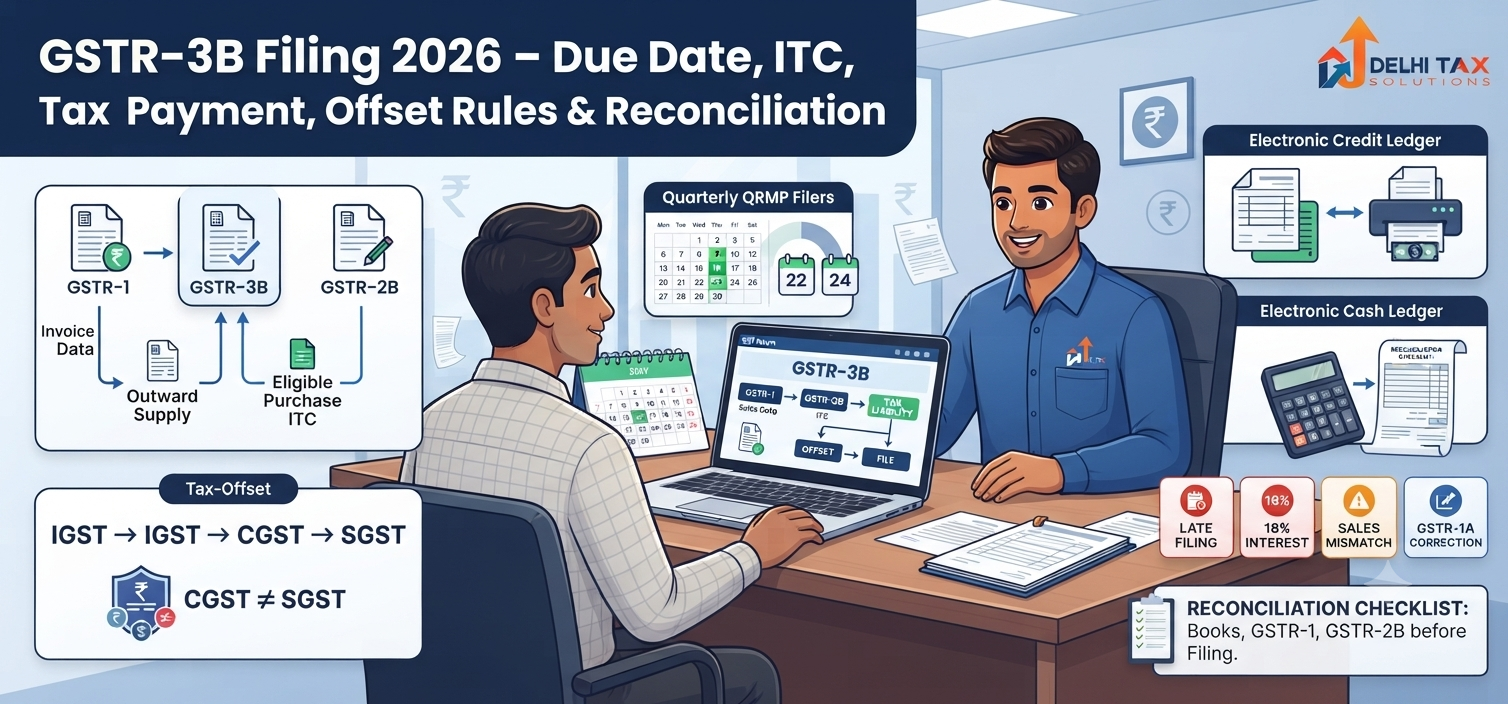
💡 Key Takeaways:
- GSTR-3B is a strictly enforced monthly summary return required for actual GST payments.
- Sales figures are now hard-locked based on upstream GSTR-1 filings.
- Input tax credits must explicitly match auto-populated GSTR-2B data.
- Late filings instantly trigger ₹50 daily fees and a severe 18% interest charge.
- Statutory rules dictate a highly rigid IGST, CGST, and SGST offset sequence.
Filing GST returns accurately goes far beyond simple legal compliance. It actively protects your hard-earned working capital and prevents unnecessary scrutiny. A single mismatched digit in your monthly summary return can freeze your legitimate tax credits. You compile sales, tally purchase invoices, and log into the portal under intense pressure. The stakes are much higher in FY 2025-26. The GST Council has tightly locked auto-population rules from upstream returns, meaning your margin for error is effectively zero.
Our CA team consistently sees small businesses incur steep interest penalties simply by misunderstanding the strict offset sequencing. This comprehensive guide breaks down exactly how to navigate the GSTR-3B framework safely. You will learn the correct procedure to offset liability, claim your Input Tax Credit (ITC) without triggering portal warnings, and avoid compounding late fees.
Whether you handle your own compliance or oversee a dedicated accounts team, mastering this process keeps your cash flow secure. Proper management keeps your business entirely off the department’s radar.
What Is GSTR-3B?
GSTR-3B is a mandatory, self-declared summary GST return filed monthly or quarterly by registered taxpayers in India. It requires businesses to consolidate and report total outbound taxable sales, claim eligible Input Tax Credit (ITC), and calculate the net tax liability for a specific period. This form serves as the primary mechanism for paying your actual tax dues to the government. Once submitted on the GST portal, this return cannot be revised.
Statutory Rules and the GSTR-3B Due Date
Missing a filing deadline triggers immediate late fees and instantly blocks subsequent filings. The government strictly enforces the GSTR-3B due date based on your aggregate business turnover and chosen filing frequency. Taxpayers with an annual turnover exceeding ₹5 crore must file on a monthly basis, as explicitly mandated by the Central Board of Indirect Taxes and Customs (CBIC). Your due date is always the 20th of the succeeding month. For example, March returns are strictly due by April 20.
Small businesses under the ₹5 crore threshold can opt for the Quarterly Return Monthly Payment (QRMP) scheme. Your return filing shifts to quarterly, but tax payments remain monthly via form PMT-06. The quarterly due date splits regionally into Category X and Category Y states.
| Filing Frequency | Turnover Limit | Applicable Due Date |
|---|---|---|
| Monthly | Above ₹5 Crore | 20th of the next month |
| Quarterly (Category X States) | Up to ₹5 Crore | 22nd of the month post-quarter |
| Quarterly (Category Y States) | Up to ₹5 Crore | 24th of the month post-quarter |
How to File GSTR-3B Online: A Step-by-Step Guide
Handling the government portal requires high precision and verified data. Auto-populated figures now strictly govern Table 3.1 and Table 3.2. You cannot manually override these locked sales fields at the summary stage.
Navigating the Dashboard
Navigate directly to the official GST Portal using your secure credentials. Go to Services > Returns > Returns Dashboard. Select the current financial year and the specific tax period. Click on ‘Prepare Online’ under the designated return tile to initiate the process to file GSTR-3B online.
Verifying Auto-Populated Data
Review Table 3.1 closely against your actual books. Based on cases handled by our CA team, discrepancies here often stem from missed invoices in earlier returns. You must fix those upstream through the new GSTR-1A correction window before proceeding with the summary filing.
Confirming Input Tax Credit
Navigate to Table 4 to check your auto-populated ITC. This data pulls directly from your system-generated GSTR-2B. Reconciling these figures is an absolute mandatory requirement. Claiming credit beyond what reflects in 2B will instantly trigger a red flag and block your processing. After verifying everything, generate the summary. File the document using your Electronic Verification Code (EVC) or Digital Signature Certificate (DSC).
Offsetting Liability and the Critical ITC Claim Process
The core function of this specific return is settling exactly what you owe the government. You offset your gross tax liability against your legally accumulated ITC. The rules mandate a highly rigid sequence for this offset.
The Golden Rules of Offsetting
IGST credit must be exhausted first. You use it to pay off IGST liability, then CGST, and finally SGST. You absolutely cannot use CGST credit to offset SGST liability, or vice versa. Cross-utilization between Central and State tax pools remains strictly prohibited under the GST Act.
Cash Ledger vs. Credit Ledger
If your eligible ITC does not cover your total tax payable, you must pay the balance in cash. Generate a challan and deposit the funds directly into your Electronic Cash Ledger. Only after the cash reflects on the portal can you finalize the offset. Do not rush this specific step. If you submit the form without fully offsetting the liability, the system marks the return as completely invalid. Proper mapping of these credits is exactly how successful businesses optimize their GST return filing.
Calculating Costly Late Fees and Interest Penalties
Delaying your statutory filing directly damages your business bottom line. You cannot proceed to the next month until these specific dues are paid in full.
Standard Late Fee Structure
For standard businesses with active transactions, the penalty is ₹50 per day of delay under the CGST Act. This splits evenly into ₹25 CGST and ₹25 SGST. The maximum penalty cap heavily depends on your turnover, but generally hits ₹5,000 per return. If you file a NIL return late, the daily fee safely drops to ₹20.
Interest on Delayed Tax Payment
Beyond the flat fee, Section 50 of the CGST Act mandates a strict 18% annual interest rate. This interest applies to the outstanding tax amount paid through the cash ledger. It accrues daily from the day following the deadline until the actual date of payment. The portal now features a convenient “Re-compute Interest” button. This specific tool ensures accurate calculation based on live system parameters rather than manual guesswork.
Mandatory Reconciliation: GSTR-3B vs GSTR-1 vs GSTR-2B
Reconciliation is no longer just a stressful year-end audit task. It operates as a strict, ongoing pre-filing requirement.
Sales Matching and Scrutiny
Your outward supplies declared in the summary return must identically match the detailed invoice data in GSTR-1. Any downward revision in the summary form triggers an automated scrutiny notice under ASMT-10. Always double-check your zero-rated and exempt supply figures prior to submission to avoid departmental friction.
ITC Verification Constraints
Your claimed ITC must never exceed the eligible credit reflecting in GSTR-2B. If a supplier fails to upload their invoice, that credit remains invisible to the portal. You legally cannot claim it. According to the GST Council’s updates, claiming unsupported ITC attracts severe penalties and immediately blocks your e-way bill generation. If your suppliers remain non-compliant, you face severe financial consequences. Protect your business operations by strictly enforcing vendor compliance protocols from the moment you complete your initial GST registration.
Maintaining flawless GST compliance requires rigorous, ongoing attention to detail. This summary return demands exact alignment with your upstream filings. Monitor your turnover limits carefully to track your correct due date. Verify every single auto-populated figure against your GSTR-2B. Settle your net liabilities promptly to avoid those aggressive 18% interest charges. Handling this entirely manually leaves massive room for incredibly costly errors. Talk to a Delhi Tax Solutions expert to get your business registered and your monthly compliance managed securely. Start proactively managing your tax compliance today.
You can explore additional financial insights across our tax and finance blogs. Staying informed protects your business against unexpected tax liabilities.
About this article: Researched using official government sources, real-time competitor and search-trend analysis, and Delhi Tax Solutions’ in-house tax advisory team. Last updated September 2026.
Disclaimer: This article is for general informational purposes and is not a substitute for personalised professional tax advice.
Frequently Asked Questions (FAQs)
Q: What happens if I miss the exact GSTR-3B due date for my business?
A: Missing the due date immediately triggers a late fee of ₹50 per day for standard returns, and ₹20 per day for NIL returns under the current rules. Additionally, you will incur a strict 18% annual interest charge on any outstanding tax liability paid in cash. The GST portal automatically blocks your next month’s outward supply filing until these exact dues are completely cleared.
Q: Can I manually correct sales figures when I file GSTR-3B online?
A: No, you absolutely cannot manually overwrite the sales figures in Table 3.1 during the summary filing stage. These specific fields are now strictly auto-populated from your upstream GSTR-1 submission. If you discover a critical billing error, you must legally use the newly introduced GSTR-1A correction window to amend the specific invoice details before proceeding with your final summary return submission on the portal.
Q: Is it mandatory to file this summary return if I had zero sales?
A: Yes, filing is legally mandatory for all registered regular taxpayers in India, even if absolutely no business activity occurred during the month. In this specific scenario, you must file a NIL return. Failing to submit a NIL return still attracts a daily late penalty of ₹20. The government provides a highly convenient SMS facility to quickly file these NIL returns without logging into the main dashboard.
Q: How does the portal calculate the exact Input Tax Credit I can claim?
A: The GST portal automatically calculates your eligible ITC by directly pulling data from your monthly GSTR-2B statement. This dynamic statement heavily depends on your vendors successfully uploading their sales invoices on time. You cannot legally claim any ITC that does not clearly reflect in your auto-generated GSTR-2B. Claiming excess credit directly invites aggressive portal warnings and immediate automated departmental scrutiny notices from the tax authorities.
Q: Can I use my CGST credit to offset my SGST liability?
A: No, the statutory tax rules strictly prohibit cross-utilizing CGST and SGST credits against each other. You must first entirely exhaust all available IGST credit to offset IGST, CGST, and SGST liabilities in that specific statutory order. Once IGST is fully depleted, you can legitimately only use CGST to offset central tax, and SGST to offset state tax. This rigid offset sequence is programmed directly into the portal.