
💡 Key Takeaways
- Identity authentication is now legally mandatory for almost all new GST applicants.
- Low-risk applications are processed entirely online via a simple mobile OTP.
- High-risk applications require an in-person visit to a GST Suvidha Kendra for iris and fingerprint scanning.
- Failing to complete verification within 15 days causes your Temporary Reference Number (TRN) to expire entirely.
- Skipping this step forces a mandatory physical site inspection by a tax officer, delaying approval by up to 30 days.
The days of securing a tax registration simply by uploading a few scanned documents are permanently over. Over the past few years, the government has aggressively cracked down on shell companies created using stolen identities to claim fraudulent input tax credits. This massive revenue leakage forced the tax department to overhaul the entire onboarding process.
Today, proving that you are exactly who you claim to be is the hardest part of launching a new enterprise. Under the latest 2026 statutory amendments, the government has deployed an AI-driven risk management system that scrutinizes every single application. If the system trusts your profile, you get a quick online approval. If it spots a red flag, it forces you offline and into a physical government center.
Understanding how the aadhaar authentication gst process actually works is crucial. A single misstep here will freeze your application, delay your launch, and lock you out of corporate contracts. In this guide, we break down exactly how the new biometric rules operate, why applications get flagged, and how our experts ensure a smooth approval.
What is Aadhaar Authentication GST?
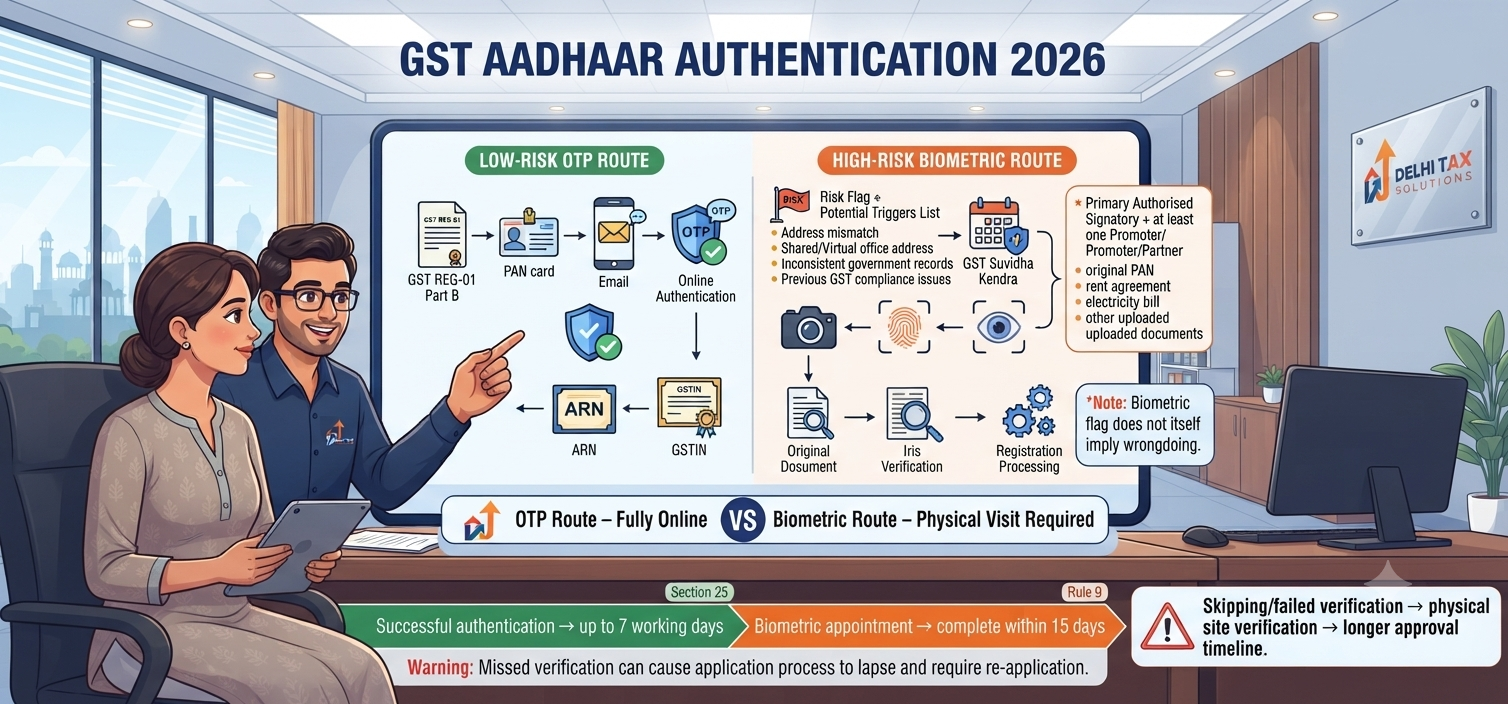
Aadhaar authentication for GST is a mandatory identity verification process required during new registration. Under Section 25 of the CGST Act, applicants must verify their identity using their government-linked mobile number via an OTP. If the portal’s risk-management system flags the application as high-risk, the applicant must physically visit a GST Suvidha Kendra for biometric gst verification, iris scanning, and original document checks before the registration is approved.
The 2026 Rule 8 Biometric Updates
The legal foundation for this entire framework rests on Rule 8(4A) of the CGST Rules, 2017. Initially rolled out as a pilot project in a few states, the Central Board of Indirect Taxes has now expanded biometric identity checks nationwide throughout 2026.
When you submit Part B of the Form GST REG-01, you are prompted to opt into identity verification. The portal immediately runs your PAN, address, and entity details through a backend data-analytics engine. This system assigns a risk score to your application instantly.
Based on this score, the system routes you down one of two paths. The first path is the standard otp authentication gst route, where you simply click a link sent to your email, enter a code, and you are done. The second path is the biometric route, which entirely disables the online OTP option and mandates an in-person physical appearance. Ignorance of this rule is costly, as operating an eligible business without an active GSTIN attracts a strict ₹10,000 baseline penalty under current Indian tax law.
OTP Route vs. GST Suvidha Kendra
If the AI engine determines your application is low-risk, you will receive an authentication link on the mobile number and email ID registered with your primary identity card. You must click this link, enter your identification number, and submit the OTP. This is purely digital. No paperwork headache. Fully online. Done in days.
However, if routed to the suvidha kendra gst process, you will receive an intimation email with a booking link. You must log back into the portal, select a nearby facilitation center, and book a specific time slot. At the center, an official will capture your live photograph, scan your fingerprints, and take an iris scan. Furthermore, you must carry all the original hard copies of the documents you uploaded in your application—such as your rent agreement, electricity bill, and PAN card. The officer verifies the originals against the digital uploads on the spot.
| Verification Feature | OTP Route (Low Risk) | Biometric Route (High Risk) |
|---|---|---|
| Method | Online link via Email/SMS | In-person physical appointment |
| Data Captured | Digital OTP verification only | Fingerprints, Iris scan, Live photo |
| Document Check | None (Automated online processing) | Mandatory physical verification of originals |
| Who Must Act | Primary Authorised Signatory | Signatory + at least one Promoter/Partner |
What Triggers a Biometric Flag?
Business owners often panic when they receive a biometric appointment notice, assuming they have done something illegal. In reality, the AI flags applications based on pattern recognition.
Based on cases handled by our CA team, the most common trigger for a physical center visit is a discrepancy between government databases. If you are applying for Company Registration and the registered office address provided to the Ministry of Corporate Affairs slightly differs from the address typed into the tax portal, the system flags it. Another massive trigger is shared office spaces. If multiple distinct businesses are using the exact same virtual office address or residential electricity bill without highly specific No Objection Certificates (NOCs), the algorithm assumes it is a shell-company cluster.
Finally, historical compliance matters. If the applicant’s PAN is linked to a previous business that had its GSTIN cancelled by the department for non-filing of returns, any new application tied to that PAN is almost guaranteed to face the stricter biometric pathway.
Registration Approval Timelines
Your choice of verification directly controls how fast you can legally start billing your clients. If you secure a clean OTP authentication, your application moves straight to the proper officer’s desk. According to Rule 9 of the CGST Rules, if the officer finds no errors, the final certificate is generated within exactly 7 working days from the date of successful authentication.
If you are routed to the biometric center, you must complete the visit within 15 days of submitting your application. If you fail to book and attend this appointment within the 15-day window, your Temporary Reference Number (TRN) simply expires. No Application Reference Number (ARN) is generated, and you must start the entire filing process from scratch on the GST Portal.
What happens if you deliberately opt out of gst verification entirely? The rules strictly mandate that applications bypassing this identity check must undergo a physical verification of the business premises. A tax inspector will physically visit your office, check your ledgers, and verify your signage. This manual route allows the department up to 30 days to approve the application, severely stalling your operations.
Conclusion
The implementation of mandatory identity authentication has fundamentally transformed how businesses enter the formal Indian economy. Whether you secure the fast-track OTP approval or are routed to a physical Suvidha Kendra, completing this verification accurately is your only path forward under Rule 8. Never let your application lapse by ignoring a biometric flag or uploading mismatched address proofs, as physical site inspections will heavily delay your launch. Get your documentation aligned perfectly before you ever log onto the portal. Talk to a Delhi Tax Solutions expert to get your GST registration filed flawlessly within 3 days.
Frequently Asked Questions (FAQs)
Q: What is the process for identity authentication in GST?
A: After submitting Part B of Form GST REG-01, applicants receive a verification link on their registered email and mobile number. Clicking this link directs them to a secure portal where they input their unique government identity number and validate it using an OTP. Successful validation generates the Application Reference Number (ARN) instantly.
Q: What happens if I am flagged for biometric GST verification?
A: If the GSTN risk-analytics engine flags your application, the online OTP link is disabled. Instead, you will receive an email instructing you to book an appointment at a designated GST Suvidha Kendra (GSK). You must visit the center within 15 days to provide live fingerprints, an iris scan, and present your original business documents.
Q: How many days does GST approval take after online OTP verification?
A: If you successfully complete the online OTP verification and your uploaded documents (like the rent agreement and electricity bill) are perfectly in order, the proper officer is required to approve your application and issue the GSTIN within 7 working days, provided no clarification notice (Form REG-03) is issued.
Q: Do all partners need to visit the GST Suvidha Kendra?
A: No. Under the latest rules, if a partnership firm or private limited company is flagged for biometric verification, the Primary Authorised Signatory must attend, alongside at least one Promoter or Managing Partner. The entire board of directors or all active partners are not required to visit the physical center.
Q: What happens if identity authentication fails or is skipped?
A: If you deliberately opt out of identity authentication, or if the authentication fails due to mismatched demographic data, your application defaults to a high-risk manual track. The tax department is then legally mandated to conduct a physical site verification of your declared business premises, extending the final approval timeline up to 30 days.
This article is for general informational purposes and is not a substitute for personalised professional tax advice. About this article: Researched using official government sources, real-time competitor and search-trend analysis, and Delhi Tax Solutions’ in-house tax advisory team. Last updated September 2026.