💡 Key Takeaways
- E-invoices cannot be directly edited or modified on the Invoice Registration Portal (IRP) once an IRN is generated.
- You can cancel a generated e-invoice on the IRP within a strict 24-hour limit from the exact time of generation.
- An e-invoice cannot be canceled if an active E-Way Bill is attached; the E-Way Bill must be canceled first.
- Once an IRN is canceled, that specific invoice number can never be reused in the same financial year.
- If the 24-hour window lapses, you must issue a Credit Note or Debit Note or adjust entries in Form GSTR-1 to modify the transaction legally.
Generating an e-invoice is a critical operational task, but mistakes—such as entering incorrect tax rates, wrong buyer GSTINs, or inaccurate item quantities—are inevitable in everyday business operations. When an error occurs, taxpayers immediately ask how canceling or modifying e-invoices works under GST rules. Navigating this process correctly is essential to avoid tax discrepancies, buyer ITC mismatches, and compliance penalties.
The standard response under GST e-invoicing framework is twofold: direct editing is strictly prohibited on the government portal, and cancellation on the server comes with a firm deadline. Understanding the procedural nuances of the **24 hour limit IRN** rule and knowing how to rectify errors after this deadline passes is vital for every finance team. This guide outlines the exact mechanisms for canceling or modifying e-invoices, covering IRP rules, E-Way Bill dependencies, and GSTR-1 credit note protocols.
Can You Directly Modify an E-Invoice on the IRP?
The short answer is no. Once an Invoice Reference Number (IRN) is generated by the Invoice Registration Portal (IRP), the central system freezes the payload data. There is no edit option, amendment button, or update function on the e-invoice portal.
Because the IRN is a unique cryptographic hash derived from the supplier GSTIN, document type, document number, and financial year, altering any value would invalidate the hash. Therefore, if you need to correct an error on a generated e-invoice, you have only two choices depending on the time elapsed:
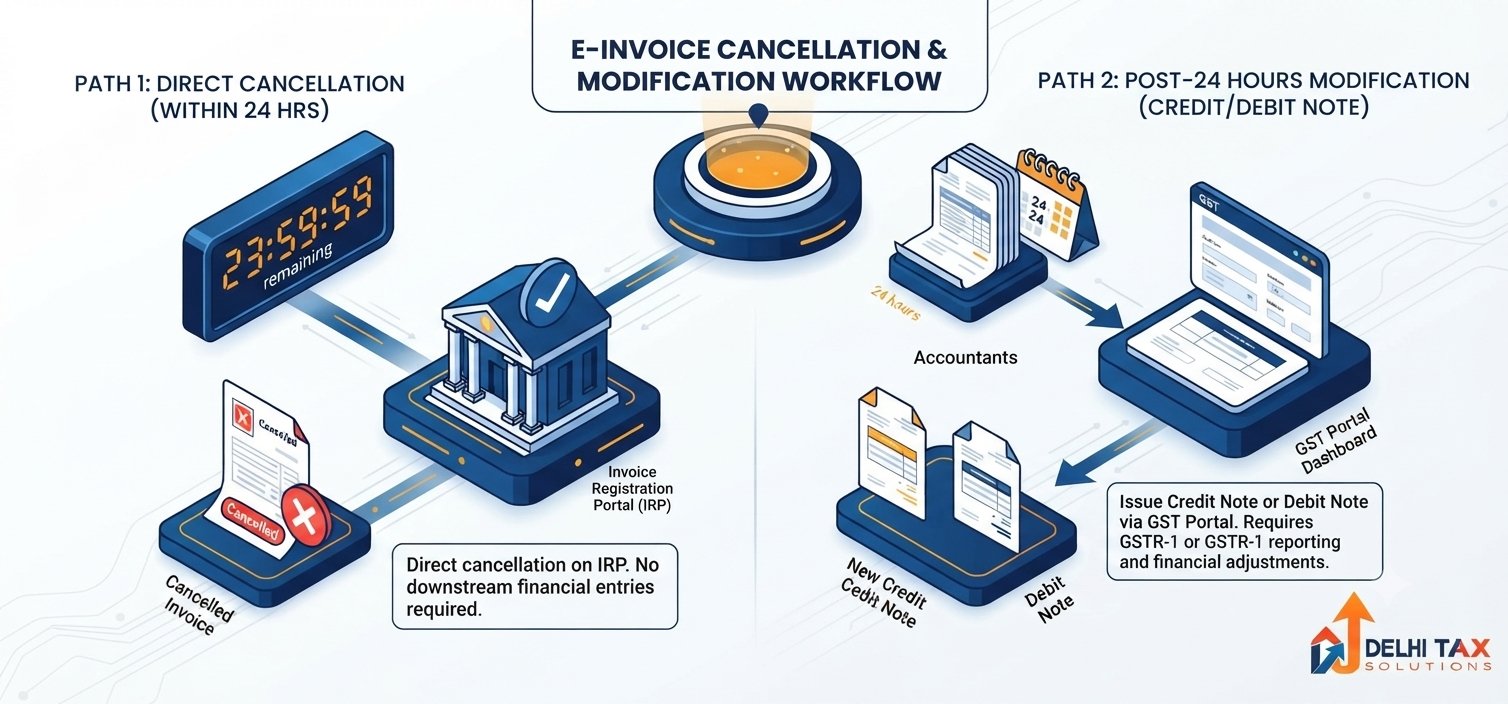
- Within 24 Hours: Cancel the entire e-invoice on the IRP and issue a completely new invoice with a new invoice number.
- After 24 Hours: Adjust the transaction on the main GST Portal via Credit Notes, Debit Notes, or GSTR-1 return amendments.
The 24-Hour Rule for Canceling E-Invoices
Under GST e-invoicing provisions, taxpayers are granted a limited window to cancel a generated IRN directly on the portal. However, strict rules govern this cancellation process:
- Strict 24-Hour Time Limit: Cancellation must occur within exactly 24 hours of IRN generation. For instance, if an IRN is generated at 11:00 AM on Monday, it can only be canceled until 11:00 AM on Tuesday.
- Active E-Way Bill Restriction: If an E-Way Bill was generated alongside or linked to the e-invoice and goods are already in transit (or validated by an officer), the IRP will block IRN cancellation. You must cancel the E-Way Bill first.
- No Reuse of Invoice Number: Once an IRN is canceled, the government registry retains the invoice number in its database. You cannot reuse the same invoice number to generate a fresh e-invoice in that financial year.
- Reason for Cancellation is Mandatory: The portal requires you to select a specific cancellation reason code (e.g., Duplicate, Data Entry Error).
Step-by-Step Guide: How to Cancel an E-Invoice on IRP
If you are within the 24-hour limit, follow these steps to cancel an e-invoice directly through the portal or your integrated ERP:
Step 1: Access the Cancellation Interface
Log in to the official IRP dashboard or open your GSP-integrated accounting software (such as Tally, Zoho, or SAP).
Step 2: Locate the Invoice / IRN
Navigate to the E-Invoice / IRN management section and locate the document using the 64-character IRN string or your internal invoice number and date.
Step 3: Select Cancellation Reason
Click on “Cancel IRN”. Select the applicable statutory reason code from the dropdown menu:
- 1 – Duplicate entry
- 2 – Data entry error
- 3 – Order canceled
- 4 – Others
Step 4: Confirm Cancellation and Receive Signed Ack
Submit the cancellation payload. The IRP updates the IRN status to “Canceled”, attaches a cancellation timestamp, and syncs this updated status with the main GST portal and GSTR-1 system.
⚡ Quick Summary
When canceling or modifying e-invoices, remember that direct editing on the IRP is impossible. You must cancel the entire e-invoice on the IRP within 24 hours (provided no active E-Way Bill blocks it) and issue a new invoice with a fresh number. After 24 hours, modifications must be handled via Credit/Debit Notes or GSTR-1 amendments.
How to Modify E-Invoices After 24 Hours
If the 24-hour window has lapsed, the IRP strictly blocks cancellation requests. In this scenario, you must handle modifications through standard statutory mechanisms on the main GST portal.
| Scenario / Objective | Statutory Mechanism | Action Required |
|---|---|---|
| Full Order Cancellation / Rejection | Issue Credit Note (e-CDN) | Generate a Credit Note in your ERP, obtain a fresh IRN for the Credit Note on IRP, nullifying tax liability. |
| Undercharged Price or Quantity | Issue Debit Note (e-DN) | Generate a Debit Note for the incremental value, obtain an IRN for the Debit Note to pass on additional tax liability. |
| Clerical Error in GSTIN or Item Details | GSTR-1 Return Amendment | Manually edit the auto-populated Table 4 entry in Form GSTR-1 on the GST Common Portal before monthly filing. |
Common Mistakes to Avoid When Canceling E-Invoices
- Attempting to Reuse Invoice Numbers: Trying to issue a new invoice using the same document number as a canceled e-invoice results in immediate system rejections (Error Code 2150). Always increment your document numbering sequence.
- Ignoring Linked E-Way Bills: Trying to cancel an IRN while an E-Way Bill remains active leads to failure. Always verify and cancel the E-Way Bill first.
- Delaying Action Beyond 24 Hours: Assuming the 24-hour rule operates on calendar days rather than exact timestamp hours is a frequent error. Act immediately upon discovering a mistake.
Frequently Asked Questions (FAQs)
+ Q: Can I modify minor details on an e-invoice without canceling it?
A: No. The IRP does not support partial modifications or editing of fields once an IRN is created. You must either cancel the e-invoice within 24 hours or issue a Credit/Debit Note / GSTR-1 amendment after 24 hours.
+ Q: What happens if I miss the 24-hour limit to cancel an e-invoice?
A: Once the 24-hour window expires, direct IRP cancellation is blocked. You must rectify the error by issuing a Credit Note (which also requires an IRN if B2B) or by manually amending the auto-populated details in Form GSTR-1 on the GST portal before filing.
+ Q: Can I reuse the invoice number of a canceled e-invoice?
A: No. GST rules strictly prohibit reusing an invoice number once an IRN has been generated and subsequently canceled. You must generate a fresh invoice with a unique serial number.
+ Q: Why is the portal blocking my e-invoice cancellation request?
A: Cancellation is usually blocked for two main reasons: either the 24-hour window from the time of generation has passed, or there is an active E-Way Bill connected to the IRN. Cancel the E-Way Bill first before attempting IRN cancellation.
+ Q: Does the buyer get notified when an e-invoice is canceled?
A: Yes, when an e-invoice is canceled on the IRP, the status updates across the GST system, and the corresponding auto-populated entry in the buyer’s Form GSTR-2B is removed or updated accordingly.
Master E-Invoicing Compliance with Delhi Tax Solutions
Dealing with missed cancellation deadlines, Credit Note generation, or GSTR-1 mismatches? Improperly handling e-invoice errors can lead to tax penalties and buyer ITC disputes.
Our professional CA team provides end-to-end GST Compliance Services, ensuring seamless error resolution, GSTR-1 return reconciliation, and full compliance under GST laws. Contact us today for expert tax support.
About this article: Prepared using official GSTN guidelines, IRP technical manuals, and Delhi Tax Solutions’ senior tax advisory insights. Last updated September 2026.
Disclaimer: This article offers operational guidance on GST compliance and does not constitute formal legal or professional tax counsel.