
💡 Key Takeaways
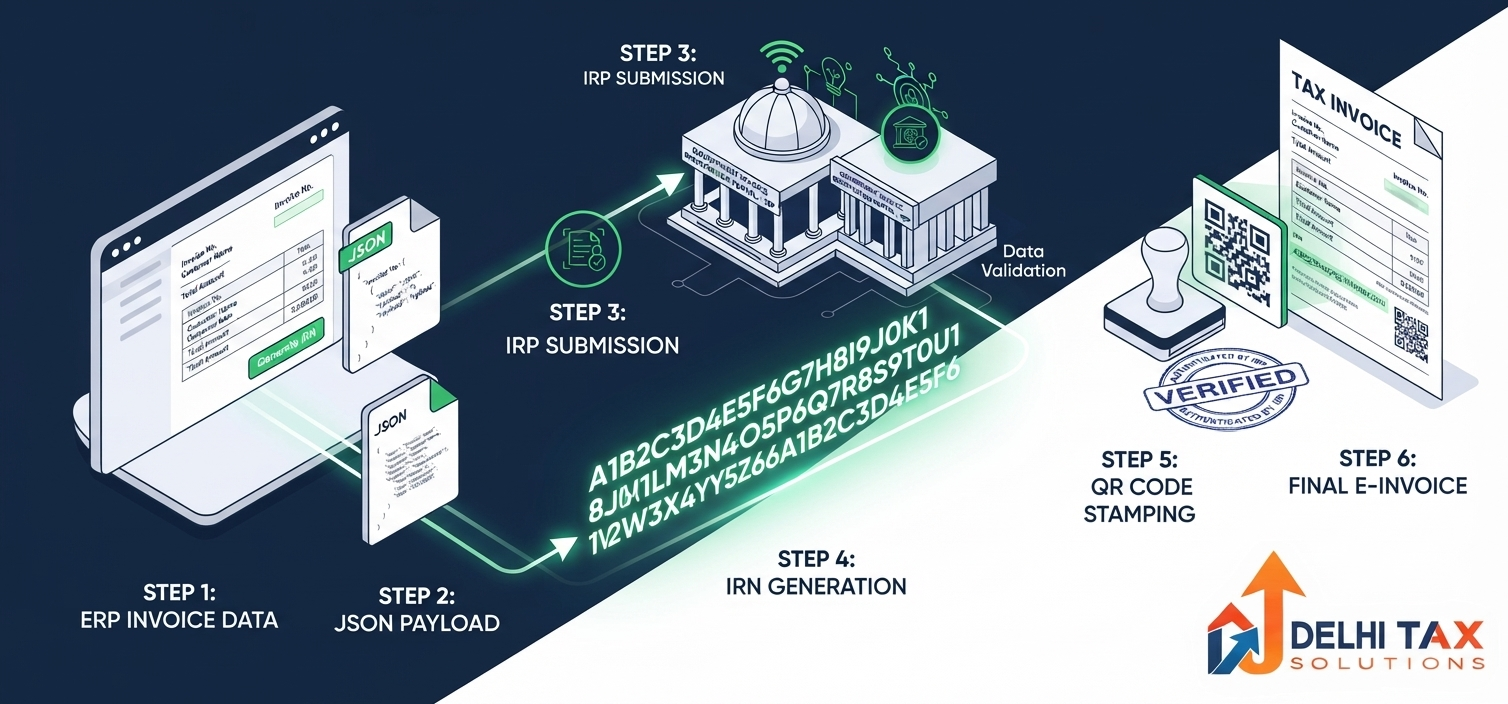
- Generating an e-invoice involves formatting ERP data into an eINV-01 JSON schema and uploading it to the Invoice Registration Portal (IRP).
- The IRP does not create the invoice; it simply validates your data and returns a unique 64-character Invoice Reference Number (IRN).
- A digitally signed QR Code is generated alongside the IRN, which must be clearly printed on the final PDF or physical invoice.
- IRNs can be generated via direct API, GST Suvidha Providers (GSP), or a free government offline bulk Excel utility.
- You only have a strict 24-hour window to cancel an e-invoice on the IRP, provided an active E-Way bill has not been attached.
With GST e-invoicing compliance progressively encompassing smaller businesses, generating a valid Invoice Reference Number (IRN) is now a non-negotiable daily operation. Unlike standard commercial billing, you can no longer simply print a PDF from your accounting software and hand it to a corporate buyer. A legally valid B2B invoice requires real-time digital validation from a government-authorized Invoice Registration Portal (IRP). For finance managers and business owners, transitioning from traditional invoicing to an IRP-compliant digital workflow is critical to maintaining uninterrupted supply chains, ensuring buyer Input Tax Credit (ITC), and avoiding penalties.
A common misconception is that businesses must log into a government website to manually type out their invoices. In reality, the e-invoicing system is designed for machine-to-machine integration. The process involves structuring your existing billing data into a standardized JSON payload and transmitting it to the IRP for instant validation. This comprehensive procedural guide walks you through the exact five-step workflow to **generate an e-invoice**, dissects the anatomy of the IRN and QR code, outlines available integration modes, and details the strict cancellation protocols required for 2026 GST compliance.
What is an E-Invoice, IRN, and IRP?
Before executing the workflow, it is crucial to understand the distinct technical terms that define the e-invoicing architecture under Rule 48(4) of the CGST Rules.
- E-Invoice: A standard tax invoice that has been successfully registered, validated, and digitally signed by the government portal. The government does not generate the invoice for you; you generate it in your ERP, and the government validates it.
- IRP (Invoice Registration Portal): The authorized gateway—such as einvoice1.gst.gov.in or portals operated by NIC, Clear, or Jio—where invoice data is uploaded for validation.
- IRN (Invoice Reference Number): A unique 64-character alphanumeric hash generated by the IRP using the RSA256 encryption algorithm. It ensures no duplicate invoices are ever submitted.
The Anatomy of the IRN Hash
The IRP generates the 64-character IRN by combining four specific data points from your invoice payload. If any of these four elements match a previously generated invoice, the portal will reject the request as a duplicate:
- Supplier GSTIN
- Financial Year (e.g., 2026-27)
- Document Type (INV for Invoice, CRN for Credit Note, DBN for Debit Note)
- Document Number (Your internal invoice number)
Mandatory Prerequisites to Generate IRN
To successfully communicate with the Invoice Registration Portal, your business must ensure the following prerequisites are met:
- IRP Portal Registration: Registration on the main GST Portal does not automatically grant IRP access. You must create separate API login credentials on the e-invoice portal.
- E-Invoicing Enablement: Your GSTIN status on the IRP must show as “Enabled for e-Invoicing”.
- ERP Readiness: Your billing software must be capable of exporting data in the standardized eINV-01 JSON schema, or you must be prepared to use the offline Excel utility.
- Accurate Master Data: Ensure all customer GSTINs, pin codes, state codes, and HSN codes are perfectly accurate. The IRP will instantly reject payloads containing invalid HSN formats or mismatched pin/state codes.
Step-by-Step Process to Generate an E-Invoice (IRN)
The generation of an e-invoice follows a precise, sequential flow of data from the supplier’s ecosystem to the government’s server and back.
Step 1: Create the Invoice in Your ERP
Generate a standard tax invoice within your ERP system or accounting software exactly as you normally would. Ensure all mandatory fields—Supplier GSTIN, Buyer GSTIN, Invoice Date, Invoice Number, HSN Code, Item Value, Tax Rate, and Place of Supply—are meticulously filled out.
Step 2: Convert Invoice Data into JSON Payload
The IRP cannot read PDF, Word, or raw Excel files; it only reads structured JSON (JavaScript Object Notation). Your software must map the invoice data to the official eINV-01 schema and generate a JSON file. If you use a modern ERP (like TallyPrime, Zoho, or SAP), this conversion happens automatically in the background.
Step 3: Upload JSON to the Invoice Registration Portal
Push the JSON payload to the IRP. This transmission occurs either via direct API integration, through a GST Suvidha Provider (GSP), or by manually uploading the file via the government’s offline bulk generation tool.
Step 4: IRP Validation and Hash Generation
Upon receiving the JSON, the IRP performs rapid validation checks. It confirms the supplier’s eligibility, verifies the buyer’s GSTIN, cross-checks HSN validity, and ensures the invoice number hasn’t been used previously in the financial year. Upon successful validation, the IRP generates the 64-character IRN and digitally signs the file.
Step 5: Return of Signed JSON and Auto-Population
The IRP returns a digitally signed JSON payload containing the IRN and a QR code back to your ERP system. Simultaneously, the IRP transmits the validated data to the GST Common Portal to auto-populate Table 4 of your Form GSTR-1, and to the E-Way Bill portal to generate Part-A of the E-Way Bill (if requested in the payload).
⚡ Quick Summary
To generate an e-invoice, create standard billing data in your ERP, convert it to the eINV-01 JSON schema, and upload it to the Invoice Registration Portal (IRP). The portal validates the data against duplication rules, generates a unique 64-character IRN, and embeds a digitally signed QR code that must be printed on the final invoice document.
Available Integration Methods for Generating IRN
Businesses have varied operational volumes and IT budgets. The government provides multiple pathways to connect to the IRP, ensuring both MSMEs and large corporations can comply seamlessly.
| Generation Method | Best Suited For | Workflow Description |
|---|---|---|
| Direct API via ERP | Large Enterprises (SAP, Oracle) | Direct, automated connection from the company server to the IRP. Requires stringent static IP whitelisting. |
| GST Suvidha Provider (GSP) | Mid-Sized Businesses (Tally, Zoho) | ERP routes JSON through an authorized third-party GSP platform. Easiest setup for most users with 1-click generation. |
| Offline Bulk Utility | Small Businesses / Low Volume | Enter data into the free Gepp Excel utility, generate JSON locally, and manually upload to the IRP web dashboard. |
| Mobile App (NIC) | Micro-Enterprises / Retail B2B | Manual entry of invoice details directly into the official e-invoice mobile application. |
Anatomy of the E-Invoice QR Code
A legally compliant e-invoice must display the digitally signed QR code generated by the IRP. Without this scannable code, the printed invoice is considered invalid, regardless of whether the IRN is typed out. The QR code acts as an offline verification tool for tax officers and contains the following encapsulated data:
- GSTIN of Supplier and Recipient
- Invoice Number and Document Date
- Invoice Value (Total Taxable Value and Gross Tax Amount)
- Total Number of Line Items
- Main HSN Code (The item carrying the highest taxable value)
- The Unique 64-character IRN Hash
How to Cancel an E-Invoice (IRN)
Mistakes happen—wrong tax rates, incorrect buyer details, or cancelled orders. However, correcting an e-invoice is bound by strict statutory timelines. E-invoices cannot be partially amended on the IRP; they must be fully cancelled.
- The 24-Hour Rule: You can only cancel an IRN directly on the Invoice Registration Portal within 24 hours of generation.
- E-Way Bill Constraint: If a valid E-Way Bill is attached to the IRN, the IRP will block cancellation. You must cancel the E-Way bill first, then cancel the IRN.
- Post 24-Hour Protocol: If the 24-hour window lapses, you cannot cancel the IRN on the IRP. Instead, you must manually amend or delete the corresponding entry in Form GSTR-1 on the main GST portal before filing your monthly returns. You must then generate a new invoice with a distinct document number.
Frequently Asked Questions (FAQs)
+ Q: Can I generate an e-invoice directly on the main GST portal?
A: No. E-invoices cannot be generated on the main gst.gov.in portal. They must be validated through designated Invoice Registration Portals (IRP) such as einvoice1.gst.gov.in or other government-authorized NIC/private portals.
+ Q: What if my ERP system fails to generate the JSON payload?
A: If your ERP integration fails or goes offline, you can use the free government-provided Excel Offline Utility (Gepp tool). You input your invoice details into the Excel file, click generate to create a local JSON file, and upload it manually via the IRP dashboard to receive your IRN.
+ Q: Do I need to print the e-invoice in color for the QR code to be valid?
A: No, color printing is not mandatory. You can print the e-invoice in black and white on standard A4 paper. However, the print resolution must be high enough so that mobile tax officers can easily scan the QR code without distortion.
+ Q: What happens if I try to generate an IRN for the same invoice number twice?
A: The IRP maintains a central registry of all IRNs generated in a financial year. If you attempt to upload a JSON payload with a document number that has already been registered, the portal will reject the request and throw a duplicate invoice error code (Error 2150).
+ Q: Is IRN generation mandatory for all my invoices?
A: If you cross the ₹5 Crore aggregate turnover threshold, you must generate an IRN for all B2B supplies, exports, and SEZ transactions. However, B2C (Business-to-Consumer) invoices and purely exempt supplies (Bill of Supply) do not require an IRN.
Automate Your E-Invoicing with Delhi Tax Solutions
Struggling with JSON payload errors, duplicate invoice rejections, or API integration setups? A disrupted e-invoicing workflow delays dispatches, upsets buyers awaiting ITC, and triggers compliance notices.
Our CA-led team provides complete GST Compliance Services, ensuring your ERP flawlessly communicates with the IRP. Let us handle schema validations, error code troubleshooting, and GSTR-1 reconciliation. Contact our tax experts today for seamless e-invoice onboarding.
About this article: Researched using official NIC documentation, IRP API schemas, and Delhi Tax Solutions’ technical tax advisory team. Last updated September 2026.
Disclaimer: This article provides general technical and procedural information regarding the IRP portal and is not a substitute for tailored professional IT or tax advisory.