
💡 Key Takeaways
- You must file an amendment within exactly 15 days of any factual change in your business operations.
- Core amendments (like changing your business address) require manual officer approval within 15 working days.
- Non-core amendments (like updating your email or bank account) are auto-approved instantly upon submission.
- You cannot change your PAN or shift your principal address to a completely different state via amendment.
- Submitting Form GST REG-14 requires identity authentication or a Digital Signature Certificate (DSC).
Business operations evolve constantly. You might move into a larger office space, bring on a new managing partner, or completely rebrand your storefront. While these operational shifts feel like standard growth milestones, the tax department views them strictly as compliance events.
Failing to update your tax records to match your physical reality is a rapid path to frozen e-way bills and hefty penalties. If a tax officer intercepts your shipment and the invoice address does not perfectly match your GST certificate, they have the legal authority to detain your goods under the CGST Act. The Central Board of Indirect Taxes (CBIC) requires you to formally notify them within 15 days of any such changes.
Executing a modify gst registration request seems simple on paper, but navigating the portal’s strict categorization can be tricky. In this guide, we break down exactly how to navigate the portal, what documents you need, and how to avoid the common errors that trigger officer rejections.
Core vs Non-Core Amendment: What is the Difference?
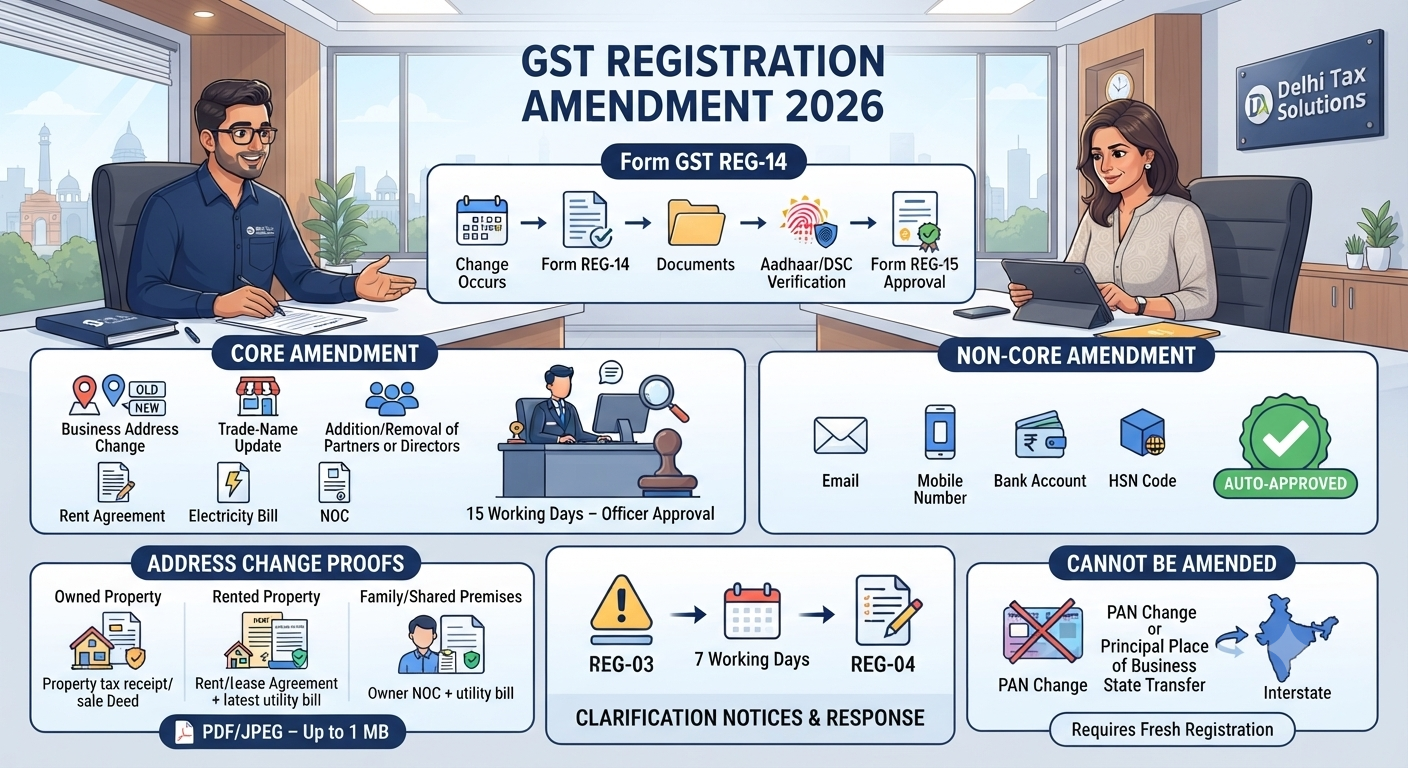
A core vs non-core amendment in GST separates major structural changes from minor administrative updates. Core fields—such as your legal trade name, principal place of business, and addition of partners/directors—require manual verification and approval by a tax officer. Non-core fields—like bank account details, email addresses, and phone numbers—are auto-approved immediately by the portal system upon successful submission without any officer intervention.
Understanding Core Fields
Because these fields fundamentally alter the identity and location of the taxpayer, the government mandates strict oversight. Core amendments apply to:
- Changing the trade name of your business (without changing the PAN).
- Shifting the principal or additional place of business (within the same state).
- Adding, retiring, or removing partners, directors, Karta, or Managing Committee members.
When you submit a core field change, the proper officer has 15 working days to either approve the request (issuing Form GST REG-15) or raise a query.
Understanding Non-Core Fields
Administrative details that do not impact your fundamental tax identity fall here. If you simply need to update email in gst, change the authorized signatory’s phone number, or update your bank account details, you use the non-core tab. Once you authenticate the application with an OTP, the changes reflect instantly on your dashboard.
| Feature | Core Field Amendment | Non-Core Field Amendment |
|---|---|---|
| Examples | Address change, Trade name, Directors | Email, Phone, Bank Account, HSN Codes |
| Officer Approval | Mandatory (Takes up to 15 days) | Not Required (Auto-approved instantly) |
| Supporting Docs | Mandatory (e.g., Rent agreement, NOC) | Only required for Bank updates (Cancelled cheque) |
| Form Used | Form GST REG-14 | Form GST REG-14 |
How to Change Address in GST Registration
Relocating your office is the most common reason business owners trigger the gst amendment process. Your primary operating location is recorded as your Principal Place of Business. To change it successfully, your supporting paperwork must be flawless.
Required Documents for Address Change
The tax portal enforces strict upload constraints. All documents must be in PDF or JPEG format and cannot exceed 1 MB per file. If you are moving to a rented property, you must upload a valid, notarized rent agreement. However, a rent agreement alone is insufficient. You must pair it with a document proving the landlord’s ownership, such as the latest electricity bill or a municipal property tax receipt.
If you are operating from a shared family space or a property owned by a relative where no rent is paid, you must draft a No Objection Certificate (NOC). This consent letter from the legal owner must be uploaded alongside their electricity bill. Ensure the name printed on the electricity bill matches the name on the NOC character-for-character.
Step-by-Step Portal Navigation (Form REG-14)
The entire amendment is filed digitally. No paperwork headache. Fully online. Done in days. Here is the exact sequence:
- Log into the GST Portal using your username and password.
- Navigate to Services > Registration. From the dropdown, select either “Amendment of Registration Core Fields” or “Non-Core Fields” depending on your need.
- If you want to change address in gst, click the ‘Principal Place of Business’ tab. Click the ‘Edit’ icon.
- Input your new address, enter the precise Date of Amendment, and type a brief reason (e.g., “Relocated office for business expansion”).
- Upload your compressed rent agreement and electricity bill.
- Navigate to the ‘Verification’ tab. Select the authorized signatory.
- Submit the application using identity authentication (OTP) or a Class 3 Digital Signature Certificate (DSC). Note: Companies and LLPs must use a DSC as per Ministry of Corporate Affairs alignment rules.
Once submitted, the system generates an Application Reference Number (ARN) for tracking.
What Our CA Team Sees in Practice
Filing the amendment is easy; dealing with the tax officer’s scrutiny is where businesses stumble. Based on cases handled by our CA team, officers frequently halt address changes by issuing a clarification notice in Form GST REG-03.
This usually happens when there is a mismatch. For example, your rent agreement might list “Shop No. 4, Ground Floor,” but your manual entry on the portal just says “Shop No. 4.” The officer will flag the discrepancy. When you receive a REG-03 notice, you have exactly 7 working days to reply using Form GST REG-04. When clients come to us for GST Registration & Filing support after getting stuck, we immediately cross-verify their utility bills against their manual inputs. By providing a clear, itemized response with perfectly aligned documents, we force the officer to issue the approval order in Form GST REG-15 without further delay.
What Cannot be Amended?
Not every change can be fixed with Form REG-14. Certain operational shifts completely break your existing tax identity.
You cannot change your Permanent Account Number (PAN). Because a GSTIN is legally anchored to a specific PAN, changing your business constitution—like upgrading from a sole proprietorship to a Private Limited company via Company Registration—alters the PAN entirely. You must cancel the old registration and apply fresh.
Similarly, you cannot shift your Principal Place of Business to a completely different state. GST is a state-specific tax. If you move your operations from Delhi to Haryana, you must surrender the Delhi GSTIN and initiate a new Start-up Registration in Haryana.
Conclusion
Keeping your tax records accurate is a non-negotiable compliance duty. Whether you need to execute a core modify gst registration to update your physical address, or simply rely on the non-core tab to change a phone number, knowing the difference dictates how fast you get approved. Always upload perfectly legible documents, respect the 1 MB file limit, and never ignore a REG-03 clarification notice. Talk to a Delhi Tax Solutions expert to get your GST registration filed and amended seamlessly within 3 days.
Frequently Asked Questions (FAQs)
Q: How can I change my address in GST registration?
A: To update your business address, log into the GST portal and select “Amendment of Registration Core Fields” under the Services tab. Edit the Principal Place of Business details, state the date and reason for the change, and upload a valid address proof (like a rent agreement plus an electricity bill). Finally, verify the submission using an OTP or DSC.
Q: What is the difference between core and non-core amendment in GST?
A: Core amendments involve major identity changes like the business legal name, address, or adding/removing directors, and require manual approval from a tax officer within 15 days. Non-core amendments cover minor administrative details like updating email IDs, mobile numbers, or bank accounts, and are automatically approved by the portal instantly upon submission.
Q: What is the time limit to file a GST amendment application?
A: Under the CGST Rules, 2017, any taxpayer who experiences a factual change in their business operations must file an amendment application (Form GST REG-14) within exactly 15 days from the date the change occurred. Failing to update these details within the timeframe can lead to compliance scrutiny and penalties.
Q: Can I change my PAN or state in GST registration?
A: No, you cannot change your PAN or shift your principal place of business to a completely different state using an amendment application. Because GST registrations are state-specific and strictly tied to a unique PAN, you must cancel your existing GSTIN and apply for a completely fresh registration in the new state or under the new PAN.
Q: How do I update my email ID and mobile number in the GST portal?
A: Updating your contact details is a non-core amendment. Navigate to “Amendment of Registration Non-Core Fields” on the portal, click the authorized signatory tab, and enter the new email ID and mobile number. The system will send OTPs to the new contact points. Once verified and submitted, the updated contact details reflect immediately without officer intervention.
This article is for general informational purposes and is not a substitute for personalised professional tax advice. About this article: Researched using official government sources, real-time competitor and search-trend analysis, and Delhi Tax Solutions’ in-house tax advisory team. Last updated September 2026.